1 Agentic AI for Software Development: The Paradigm Shift and Core Architecture
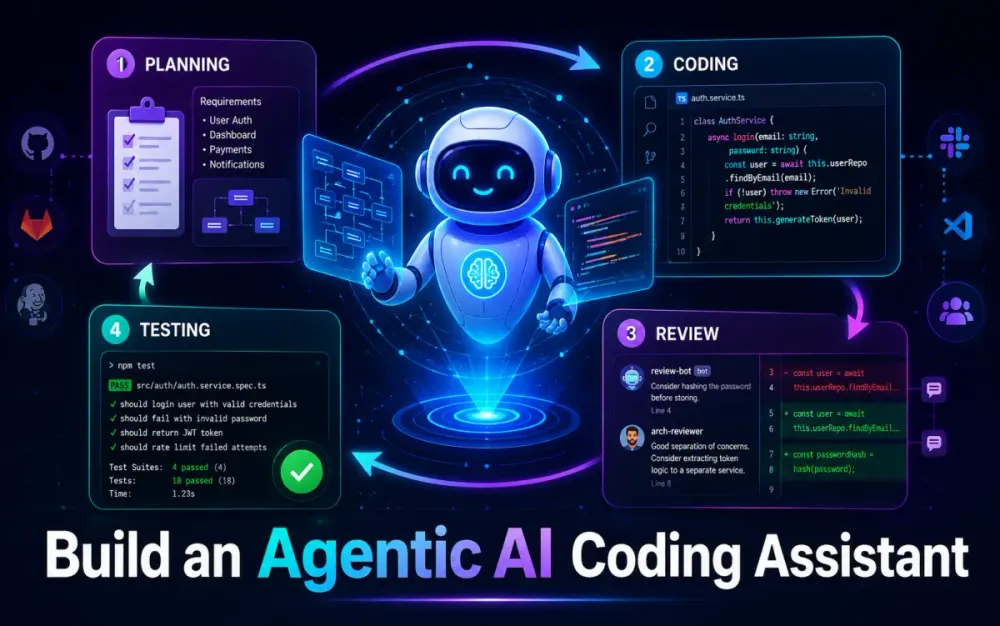
Agentic AI for software development is not just a smarter autocomplete. The useful pattern is closer to a small engineering team: one agent clarifies requirements, another proposes a design, another writes code, another reviews it, and another validates it through tests. The core question is not “Can an LLM write code?” It can. The harder question is: “Can we design a controlled workflow where AI plans, writes, reviews, and tests code without bypassing engineering discipline?”
This article covers the first three architecture layers for building that kind of coding assistant using AutoGen, Python, and enterprise runtimes such as .NET or Node.js. The requested scope is Sections 1–3 from the provided outline.
1.1 The Evolution of Software Engineering Automation
1.1.1 Beyond Autocomplete: From Inline Copilots to Agentic SDLC
The first wave of AI coding tools worked inside the editor. They completed functions, explained snippets, generated unit tests, and helped developers move faster inside a local context. That model is useful, but it is still mostly reactive. The developer drives every step.
Agentic software development changes the control flow. Instead of asking for one answer, you define a task and allow specialized agents to collaborate across steps:
Human request
   ↓
Requirements Agent
   ↓
Architecture / Planning Agent
   ↓
Developer Agent
   ↓
Reviewer Agent
   ↓
Tester Agent
   ↓
Human approval
The important difference is accountability. A coding assistant should not only generate code. It should produce a plan, show assumptions, identify affected files, create a patch, run tests, and explain the review outcome.
For senior teams, this matters because most production engineering failures are not caused by syntax mistakes. They come from unclear requirements, inconsistent architecture, missing edge cases, weak tests, poor integration boundaries, and rushed reviews. Agentic AI helps when each of those concerns is assigned to a specific role instead of being collapsed into one giant prompt.
Incorrect:
Build user registration with validation, database save, email confirmation, security, tests, and deployment.Better:
1. Convert the requirement into an implementation spec.
2. Identify affected modules and interfaces.
3. Propose a minimal design.
4. Generate code only after the design is approved.
5. Review for security, maintainability, and test coverage.
6. Run unit and integration tests.
Recommended:
{
  "feature": "User registration",
  "constraints": {
    "runtime": ".NET 9",
    "database": "PostgreSQL",
    "auth": "existing Identity provider",
    "approval_required_before_write": true
  },
  "acceptance_criteria": [
    "Reject duplicate email addresses",
    "Validate password complexity",
    "Send confirmation email asynchronously",
    "Log registration event without storing sensitive password data"
  ]
}
That JSON object becomes the contract between agents. It reduces ambiguity and gives the reviewer and tester something concrete to validate.
1.1.2 Overcoming the Single-Prompt Wall
Single-prompt coding fails when the repository is large, interdependent, or domain-heavy. The model may understand the immediate file but miss cross-cutting constraints such as logging standards, authorization policies, transaction boundaries, naming conventions, or existing test utilities.
A single context window also encourages overpacking. Teams paste requirements, code files, logs, stack traces, architectural notes, and test output into one request. The model then tries to reason over everything at once. Even with larger context windows, this is brittle because not all context has equal value.
A better pattern is retrieval and staged reasoning:
Step 1: Requirements Agent extracts the spec.
Step 2: Repository Search Tool finds relevant files.
Step 3: Developer Agent proposes a patch.
Step 4: Reviewer Agent compares the patch against standards.
Step 5: Tester Agent generates and runs targeted tests.
This is how experienced engineers work. They do not read the whole repository every time. They inspect the relevant seams: interfaces, tests, build files, dependency injection setup, domain models, and prior implementations.
The trade-off is orchestration complexity. Agentic workflows require state, tools, termination rules, and permissions. But that complexity is also what makes the system safer than a free-form “write code” prompt.
1.2 Deconstructing the Modern AutoGen Engine
1.2.1 The Actor Model in AI
AutoGen v0.4 introduced a more modular architecture than earlier AutoGen patterns. Microsoft’s documentation describes the v0.4 API as layered: Core provides a scalable, event-driven actor framework, while AgentChat sits above it as a higher-level API for common multi-agent patterns. Microsoft Research also describes AutoGen v0.4 as asynchronous and event-driven, with stronger observability and more flexible collaboration patterns.
For architects, the “actor model” framing is useful. Each agent behaves like an independent actor:
Agent receives message
Agent updates local state
Agent calls model or tool
Agent publishes response
Runtime routes message to next participant
This is different from a monolithic LLM chain. In an agent runtime, the developer agent does not need to know how the tester agent works internally. It only needs to publish an implementation result. The tester consumes that result, runs checks, and returns structured feedback.
A simplified AutoGen-style setup may look like this:
from autogen_agentchat.agents import AssistantAgent
from autogen_agentchat.teams import RoundRobinGroupChat
from autogen_agentchat.conditions import TextMentionTermination

requirements_agent = AssistantAgent(
    name="requirements_agent",
    model_client=model_client,
    system_message=(
        "Convert feature requests into precise implementation specs. "
        "Return Markdown plus a JSON acceptance criteria block."
    ),
)

developer_agent = AssistantAgent(
    name="developer_agent",
    model_client=model_client,
    system_message=(
        "Write minimal, maintainable code based only on approved specs. "
        "Explain files changed and assumptions."
    ),
)

reviewer_agent = AssistantAgent(
    name="reviewer_agent",
    model_client=model_client,
    system_message=(
        "Review code for correctness, security, maintainability, and architecture fit. "
        "Respond APPROVED only when the patch is safe."
    ),
)

team = RoundRobinGroupChat(
    participants=[requirements_agent, developer_agent, reviewer_agent],
    termination_condition=TextMentionTermination("APPROVED"),
    max_turns=8,
)
The exact production implementation will depend on the package version and model client, but the design principle is stable: separate agents, explicit roles, explicit termination.
1.2.2 The Unified Agent Ecosystem
Microsoft Agent Framework is now the strategic direction for teams that want a production-grade agent platform across .NET and Python. Microsoft describes it as combining AutoGen’s simple agent abstractions with Semantic Kernel’s enterprise capabilities such as session-based state management, type safety, middleware, telemetry, and graph-based workflows. Microsoft’s Agent Framework 1.0 announcement also positions it as the migration path for existing AutoGen and Semantic Kernel projects.
For software development assistants, this matters because many enterprises do not want an AI automation island that only runs in Python. They want the agent layer to communicate with existing build systems, CI/CD pipelines, C# services, Node.js workers, security scanners, and observability tools.
A practical architecture is:
Python Agent Orchestrator
   ├── Requirements and planning agents
   ├── Repository search tools
   ├── Code generation and review agents
   └── Test orchestration agent
          ↓
.NET or Node.js Worker
   ├── Runs build
   ├── Runs unit tests
   ├── Executes static analysis
   ├── Returns structured result
   └── Never exposes secrets directly to the LLM
The agent should request an action. The runtime should enforce whether that action is allowed.
2 Designing the Multi-Agent Team Topography
2.1 Defining Agent Personas and Separation of Concerns
2.1.1 The Product / Requirements Agent
The Requirements Agent converts human language into a technical specification. It should not write code. Its output should be stable enough for downstream agents to consume.
Example output:
## Feature: Add account lockout after failed login attempts

### Scope
Add lockout behavior to the existing authentication service.

### Acceptance Criteria
1. Lock account after 5 failed attempts within 15 minutes.
2. Unlock automatically after 30 minutes.
3. Do not reveal whether an email exists.
4. Emit security audit event after lockout.
5. Add unit tests for threshold, reset, and unlock behavior.
A stricter version can include a machine-readable block:
{
  "feature_id": "AUTH-LOCKOUT-001",
  "risk_level": "medium",
  "requires_human_approval": true,
  "affected_areas": ["authentication", "security_audit", "unit_tests"]
}
This gives the Developer Agent a bounded target and gives the Reviewer Agent a checklist.
2.1.2 The Developer Agent
The Developer Agent consumes the approved spec and searches the repository before writing. That search step is important. Without it, the agent may invent new patterns instead of following the existing codebase.
Useful tools for the Developer Agent include:
repo.search("failed login attempts")
repo.open("src/Auth/LoginService.cs")
repo.open("tests/Auth/LoginServiceTests.cs")
repo.diff()
The Developer Agent should prefer small patches. It should avoid broad refactors unless the spec explicitly asks for them.
Incorrect:
Rewrite the authentication module using a new framework.Better:
Modify LoginService to track failed attempts using the existing IUserSecurityRepository abstraction.2.1.3 The Reviewer Agent
The Reviewer Agent acts like a senior engineer. It should not merely praise the generated code. It should challenge it.
A strong reviewer prompt includes constraints:
Review the patch against:
1. Existing architecture and dependency direction
2. Security and authorization rules
3. Error handling and logging standards
4. Data privacy and secret handling
5. Test coverage for acceptance criteria
6. Performance impact and database round trips
The Reviewer Agent should receive static analysis output where possible. For .NET, that could include Roslyn analyzer results. For Node.js, it could include ESLint, TypeScript compiler output, npm audit summaries, or test coverage. For enterprise repositories, SonarQube or equivalent quality gates can be included as structured input.
The key rule: the agent reviews evidence, not vibes.
2.1.4 The Tester Agent
The Tester Agent maps changed code paths to test cases. It should not blindly generate dozens of shallow tests. It should identify which behavior changed and target those paths.
Example:
Changed file:
src/Auth/LoginService.cs

Detected behavior:
- Failed login counter increments
- Lockout threshold checked
- Lockout expiry checked
- Security audit event emitted

Required tests:
- Locks account after fifth failed attempt
- Does not lock before threshold
- Unlocks after expiry
- Does not disclose account existence
- Emits audit event once
For a .NET service, test generation may target xUnit or NUnit. For Node.js, it may target Jest, Vitest, or the project’s existing test runner.
2.2 Core Collaboration and Conversation Patterns
2.2.1 Sequential Pipelines vs. Group Chats
A sequential pipeline is best when the workflow must be deterministic:
Requirements → Design → Code → Review → Test → ApprovalUse this for regulated systems, financial systems, healthcare workflows, government platforms, or any project where traceability matters.
Group chat is better when exploration is valuable:
Planner ↔ Developer ↔ Reviewer ↔ TesterUse this when the problem is ambiguous, the architecture needs debate, or there are multiple implementation options.
The trade-off is control. Sequential pipelines are easier to audit. Group chats can find better solutions but require stricter termination rules, token limits, and human checkpoints.
2.2.2 The Planner-Executor-Critic Loop
The Planner-Executor-Critic pattern is one of the most practical designs for coding assistants.
Planner: Defines steps and constraints
Executor: Performs repository search and code changes
Critic: Reviews output and asks for correction
Executor: Revises patch
Critic: Approves or rejects
This minimizes hallucination because the developer agent is not trusted as the final authority. The critic must compare output against acceptance criteria, repository evidence, and tool output.
A useful loop result looks like this:
{
  "status": "needs_revision",
  "issues": [
    {
      "severity": "high",
      "file": "LoginService.cs",
      "problem": "Lockout check occurs after password validation, allowing unnecessary hash verification.",
      "recommended_fix": "Check active lockout before password verification."
    }
  ]
}
This structure is easier to automate than free-form review comments.
3 Enterprise Multi-Language Setup: Python, .NET, and Node.js
3.1 Environmental Orchestration and Dependencies
3.1.1 Provisioning the Hybrid Workspace
AutoGen requires Python 3.10 or later, and Microsoft’s current package guidance includes installing autogen-agentchat with relevant extensions such as OpenAI client support. The AgentChat package is the higher-level API built on top of autogen-core, while autogen-core provides the lower-level event-driven programming model.
A practical workspace for a coding assistant may look like this:
agentic-coding-assistant/
  agents/
    requirements_agent.py
    developer_agent.py
    reviewer_agent.py
    tester_agent.py
  tools/
    repo_tools.py
    build_tools.py
    test_tools.py
  workers/
    dotnet-build-worker/
    node-build-worker/
  policies/
    coding-standards.md
    security-rules.md
  docker/
    Dockerfile.dotnet
    Dockerfile.node
Baseline setup:
python -m venv .venv
source .venv/bin/activate

pip install -U autogen-core autogen-agentchat
pip install -U "autogen-ext[openai]"
For .NET:
dotnet --version
dotnet restore
dotnet test
For Node.js:
node --version
npm ci
npm test
Keep the agent orchestrator separate from the application runtime. The Python layer coordinates reasoning and tool calls. The .NET or Node.js layer builds, tests, and validates code inside controlled boundaries.
3.1.2 Package Architecture
Use autogen-agentchat when you want fast implementation of common patterns such as assistant agents, group chats, and termination conditions. Use autogen-core when you need deeper control over event routing, custom runtimes, distributed agents, or long-running workflows.
A production-oriented Python layout:
agents/
  base.py
  requirements.py
  developer.py
  reviewer.py
  tester.py

contracts/
  feature_spec.py
  review_result.py
  test_result.py

runtime/
  orchestrator.py
  termination.py
  state_store.py

tools/
  repository.py
  shell.py
  dotnet.py
  node.py
Typed contracts are important because agent output is unreliable if treated as plain text. Use Pydantic or equivalent validation so a malformed review result fails fast instead of flowing into the next step.
3.2 Cross-Runtime Communication Strategies
3.2.1 Agent-to-Agent Protocol for Python and .NET Workers
Agent-to-agent communication does not have to mean every participant is an LLM agent. In enterprise systems, some “agents” should be deterministic workers.
Example:
Python Developer Agent
   ↓ build request
.NET Build Worker
   ↓ structured result
Python Reviewer Agent
A build request can be simple JSON over HTTP, gRPC, or a queue:
{
  "repository": "claims-api",
  "branch": "agent/AUTH-LOCKOUT-001",
  "commands": [
    "dotnet restore",
    "dotnet build --no-restore",
    "dotnet test --no-build"
  ]
}
The worker response should be equally structured:
{
  "status": "failed",
  "exit_code": 1,
  "failed_tests": [
    "LoginServiceTests.LocksAccountAfterFiveFailures"
  ],
  "logs_ref": "s3://agent-runs/run-1842/test.log"
}
This keeps the LLM away from raw shell control while still giving it enough evidence to repair the patch.
3.2.2 Standardizing Tool Interfaces with MCP
The Model Context Protocol defines a standard way for applications to expose tools, resources, and prompts to AI systems. The MCP specification describes tools as callable functions for actions such as querying databases, calling APIs, or performing computations. The 2025 specification also defines resources, prompts, and tools as core server capabilities.
For a coding assistant, MCP can decouple agent logic from enterprise systems:
Agent
  ↓
MCP Client
  ↓
MCP Servers
  ├── Repository server
  ├── Jira / Azure DevOps server
  ├── Build server
  ├── Test results server
  └── Documentation server
This avoids hardcoding every integration into the agent. The agent asks for a capability; the MCP server exposes what is allowed.
The security warning is important: tool access is execution power. MCP servers must be permissioned, sandboxed, logged, and scoped. Agents should not receive unrestricted filesystem, database, or shell access.
Recommended rule:
LLM proposes intent.
Tool layer enforces policy.
Worker executes safely.
Reviewer validates result.
Human approves high-risk actions.
That is the difference between an impressive demo and a system senior engineers can trust.
4 Building the Specialist Agents with AutoGen v0.4+
The previous sections established the runtime shape: a Python orchestration layer, typed tool boundaries, and enterprise workers for .NET or Node.js. The next step is implementation. The safest way to build an agentic coding assistant is not to start with a powerful “do everything” agent. Start with small specialists that have narrow permissions, typed outputs, and clear handoff rules. AutoGen’s v0.4+ AgentChat layer supports this style through assistant agents, teams, termination conditions, and model clients, while the lower-level core remains available when you need deeper event-driven control.
4.1 Implementing the Requirements and Architecture Agent
4.1.1 Engineering System Personas
The Requirements and Architecture Agent should behave less like a chatbot and more like a technical analyst. Its job is to turn unclear human input into a stable engineering contract. That means it should extract scope, constraints, affected components, acceptance criteria, non-functional requirements, and open questions. It should also avoid writing code too early.
A useful system message is direct and restrictive:
requirements_system_message = """
You are a senior software architect preparing implementation specifications.

Rules:
1. Do not write application code.
2. Convert the user request into a precise engineering spec.
3. Identify affected modules, APIs, database objects, and test areas.
4. Mark assumptions clearly.
5. Return only:
   - Summary
   - In Scope
   - Out of Scope
   - Acceptance Criteria
   - Technical Constraints
   - Risks
   - Structured JSON Contract
6. If the request is unsafe or too broad, narrow it before implementation.
"""
Then create the agent:
from autogen_agentchat.agents import AssistantAgent

requirements_agent = AssistantAgent(
    name="requirements_architect",
    model_client=model_client,
    system_message=requirements_system_message,
)
The key is boundary control. The agent should not “helpfully” create migrations, controller code, and tests during requirements analysis. That looks productive in a demo, but it creates weak traceability. In a real repository, the implementation should not begin until the spec is explicit enough for another agent to review.
A good output from this agent is boring in the right way. It defines what will change, what will not change, and what evidence will prove completion.
{
  "feature_id": "CLAIMS-DOC-TRIAGE-007",
  "summary": "Add document classification during claim intake.",
  "affected_components": [
    "ClaimIntakeApi",
    "DocumentMetadataService",
    "ClaimDocument table",
    "DocumentTriageTests"
  ],
  "acceptance_criteria": [
    "Classify uploaded documents into configured document types.",
    "Store classification confidence separately from final examiner decision.",
    "Do not auto-reject claims based on AI classification.",
    "Log classification result for audit review."
  ],
  "requires_human_approval": true
}
This matters because the next agents do not need to infer intent again. They consume the contract.
4.1.2 Enforcing Typed Contracts
Plain JSON is not enough. Models can return extra fields, malformed arrays, or text wrapped around JSON. AutoGen documentation shows structured output patterns using Pydantic models with supported model clients, and Pydantic validation is the right layer for rejecting malformed agent output before it reaches the implementation phase.
Example contract:
from pydantic import BaseModel, Field
from typing import Literal

class FeatureSpec(BaseModel):
    feature_id: str
    summary: str
    risk_level: Literal["low", "medium", "high"]
    affected_components: list[str] = Field(min_length=1)
    acceptance_criteria: list[str] = Field(min_length=1)
    out_of_scope: list[str] = []
    requires_human_approval: bool = True
Use a validation step after the agent responds:
import json
from pydantic import ValidationError

def parse_feature_spec(raw_text: str) -> FeatureSpec:
    try:
        payload = json.loads(raw_text)
        return FeatureSpec.model_validate(payload)
    except (json.JSONDecodeError, ValidationError) as ex:
        raise ValueError(f"Invalid feature specification: {ex}") from ex
In production, do not let the Developer Agent proceed after a validation failure. Route the failure back to the Requirements Agent and ask for a corrected contract. That creates a cleaner loop than trying to repair malformed JSON inside the developer prompt.
4.2 Coding the Developer and Reviewer Pair
4.2.1 Model Agnosticism
The Developer Agent often benefits from a stronger model than the Requirements Agent because it needs long-context reasoning over code, tests, and architecture notes. The Reviewer Agent may also need a strong model when it is checking security and design implications. But not every task needs the same model. Formatting, summarization, and test result interpretation can usually run on a lower-cost model.
AutoGen model clients implement a common chat completion interface, and LiteLLM can also be used as an OpenAI-compatible access layer for many providers. LiteLLM describes itself as a unified interface and proxy for 100+ LLM providers, which is useful when teams want routing flexibility across OpenAI, Azure OpenAI, Anthropic, Bedrock, Vertex AI, or local models.
A simple model routing config may look like this:
models:
  requirements:
    provider: openai
    model: gpt-4o-mini
  developer:
    provider: litellm
    model: anthropic/claude-3-5-sonnet
  reviewer:
    provider: azure_openai
    model: gpt-4o
  tester:
    provider: openai
    model: gpt-4o-mini
The Developer Agent should also receive repository tools, not unrestricted shell access:
developer_agent = AssistantAgent(
    name="developer",
    model_client=developer_model_client,
    system_message="""
You are a senior developer implementing approved specs.

Rules:
1. Use repository search before proposing changes.
2. Keep patches minimal.
3. Follow existing naming, dependency, and test patterns.
4. Do not introduce new packages unless the spec permits it.
5. Return changed files, patch summary, and test impact.
""",
    tools=[
        search_repository,
        open_file,
        propose_patch
    ],
)
This is where the earlier architecture pays off. The agent can inspect the repository and propose changes, but the actual write operation can still require policy approval.
4.2.2 The Reviewer’s Rule-Based Logic
The Reviewer Agent should receive more than the patch. It should receive static analysis output, compiler diagnostics, test failures, and the original acceptance criteria. That turns the review into evidence-based evaluation.
For .NET, a build worker can run:
dotnet format --verify-no-changes
dotnet build --no-restore
dotnet test --no-build
For Node.js:
npm ci
npm run lint
npm run typecheck
npm test
Then inject the result into the reviewer context:
review_prompt = f"""
Review the proposed patch against the approved FeatureSpec.

FeatureSpec:
{feature_spec.model_dump_json(indent=2)}

Patch summary:
{patch_summary}

Static analysis:
{static_analysis_output}

Test results:
{test_result_output}

Return:
- APPROVED, or
- NEEDS_REVISION with specific issues and recommended fixes.
"""
A strong reviewer response should be structured:
{
  "status": "NEEDS_REVISION",
  "issues": [
    {
      "severity": "high",
      "category": "security",
      "file": "DocumentUploadController.cs",
      "problem": "Uploaded file extension is checked, but MIME type and content signature are not validated.",
      "recommended_fix": "Use the existing FileValidationService before saving metadata."
    }
  ]
}
This avoids vague feedback such as “looks good” or “add more tests.” The reviewer must identify the file, the risk, and the fix.
4.3 Coding the Test Automation Agent
4.3.1 Parsing the AST to Detect Modified Functions
The Tester Agent should not generate random tests. It should identify what changed and map tests to those execution paths. For Python services, the built-in ast module can inspect functions. For TypeScript, use the TypeScript compiler API or a parser such as tree-sitter. For .NET, Roslyn is the right choice because it understands C# syntax and semantic models.
A simple Python AST scanner:
import ast
from pathlib import Path

def list_python_functions(file_path: str) -> list[str]:
    source = Path(file_path).read_text(encoding="utf-8")
    tree = ast.parse(source)

    functions = []
    for node in ast.walk(tree):
        if isinstance(node, (ast.FunctionDef, ast.AsyncFunctionDef)):
            functions.append(node.name)

    return functions
A C# example using Roslyn:
using Microsoft.CodeAnalysis.CSharp;
using Microsoft.CodeAnalysis.CSharp.Syntax;

public static IReadOnlyList<string> GetMethodNames(string source)
{
    var tree = CSharpSyntaxTree.ParseText(source);
    var root = tree.GetCompilationUnitRoot();

    return root
        .DescendantNodes()
        .OfType<MethodDeclarationSyntax>()
        .Select(m => m.Identifier.Text)
        .ToList();
}
The Tester Agent can combine AST output with the Git diff:
Changed methods:
- ClaimDocumentService.ClassifyAsync
- ClaimDocumentService.SaveMetadataAsync

Required test focus:
- Classification confidence stored correctly
- Examiner override does not overwrite original AI classification
- Invalid file type rejected before classification
- Audit event emitted once
That is much better than “write unit tests for this service.” It makes the test scope precise.
5 Orchestration: Asynchronous Workflows and State Management
5.1 Designing the Asynchronous Workflow Loop
5.1.1 RoundRobinGroupChat and Custom Lifecycle Control
RoundRobinGroupChat works well when each agent should speak in a predictable order. AutoGen’s documentation describes it as a team pattern where agents take turns and share context, which fits a controlled engineering workflow.
A basic loop:
from autogen_agentchat.teams import RoundRobinGroupChat
from autogen_agentchat.conditions import TextMentionTermination

team = RoundRobinGroupChat(
    participants=[
        requirements_agent,
        developer_agent,
        reviewer_agent,
        tester_agent
    ],
    termination_condition=TextMentionTermination("APPROVED"),
    max_turns=10,
)

result = await team.run(task="Implement document classification for claim intake.")
This is easy to understand, but it may be too rigid. The Tester Agent does not need to run if the Reviewer Agent rejects the design before code is produced. In that case, use explicit orchestration logic outside the chat loop:
async def run_engineering_flow(task: str):
    spec = await run_requirements(task)
    await require_human_approval(spec)

    patch = await run_developer(spec)
    review = await run_reviewer(spec, patch)

    if review.status == "NEEDS_REVISION":
        patch = await run_developer_revision(spec, patch, review)

    test_result = await run_tester(spec, patch)

    if test_result.status != "PASSED":
        return await run_developer_revision(spec, patch, test_result)

    return "APPROVED"
This approach is less magical and easier to govern. Use group chat for collaboration. Use explicit orchestration for lifecycle control.
5.1.2 Graceful Degeneracy and Termination
Every agentic workflow needs a stop condition. Without one, agents can burn tokens while “improving” code that is already good enough. AutoGen supports text-based termination conditions such as stopping when a specific keyword appears in the conversation.
Use clear terminal states:
APPROVED
NEEDS_HUMAN_REVIEW
BLOCKED_BY_POLICY
TERMINATE
Do not rely only on natural language. Convert terminal states into code-level decisions:
if final_status in {"APPROVED", "TERMINATE"}:
    close_run()

if final_status == "NEEDS_HUMAN_REVIEW":
    create_pull_request_draft()
    notify_reviewer()

if final_status == "BLOCKED_BY_POLICY":
    archive_run()
    raise SecurityPolicyViolation()
Graceful degeneracy means the system fails safely. If tests fail three times, stop and escalate. If the model produces invalid contracts twice, stop and ask a human. If the requested change touches authentication, payment, or deployment scripts, require manual approval.
5.2 Ephemeral State and Context Window Management
5.2.1 Mitigating Context Overflow
Long debugging sessions can overflow context quickly. Build logs, test failures, diffs, and repeated review comments can consume thousands of tokens. The fix is not always a larger model. The better pattern is context compression.
Keep full artifacts outside the prompt and pass references plus summaries:
{
  "run_id": "agent-run-4821",
  "diff_ref": "storage://runs/4821/patch.diff",
  "test_log_ref": "storage://runs/4821/test.log",
  "summary": {
    "changed_files": 4,
    "failed_tests": 2,
    "primary_failure": "NullReferenceException in ClaimDocumentServiceTests"
  }
}
The agent only receives the relevant slice:
def build_debug_context(test_log: str, max_lines: int = 80) -> str:
    lines = test_log.splitlines()
    failure_lines = [
        line for line in lines
        if "FAILED" in line or "Exception" in line or "Error" in line
    ]
    return "\n".join(failure_lines[:max_lines])
This keeps the conversation focused. It also reduces cost and avoids burying important evidence inside noisy logs.
5.2.2 Distributed State Management with Redis
For long-running tasks, state should not live only in process memory. A worker may restart. A model call may timeout. A human approval may arrive hours later. Store run state externally.
Redis is a practical choice for ephemeral workflow state:
import json
import redis

r = redis.Redis(host="localhost", port=6379, decode_responses=True)

def save_agent_state(run_id: str, state: dict) -> None:
    key = f"agent-run:{run_id}"
    r.setex(key, 86400, json.dumps(state))

def load_agent_state(run_id: str) -> dict:
    raw = r.get(f"agent-run:{run_id}")
    if raw is None:
        raise KeyError(f"No state found for run {run_id}")
    return json.loads(raw)
Store only what is needed: current phase, approved spec, artifact references, review status, retry count, and approval state. Avoid storing secrets, raw source dumps, or unnecessary personal data.
6 Code Execution Sandboxing and Infrastructure Integration
6.1 The Isolated Execution Engine
6.1.1 The Criticality of Isolation
Agent-generated code should never run directly on a developer laptop, shared build server, or production-connected VM. Even non-malicious code can delete files, leak environment variables, overload the machine, or call external services during tests. The risk increases when tools allow shell access.
The safer pattern is:
Agent proposes code
Policy layer approves execution type
Sandbox runs build and tests
Logs are captured
Result is returned to agents
Sandbox is destroyed
The sandbox should have limited CPU, memory, filesystem scope, network access, and execution time. It should not have access to production secrets. If integration tests require credentials, use short-lived test credentials stored outside the LLM context.
6.1.2 Implementing DockerCommandLineCodeExecutor
AutoGen provides Docker-based code execution support for running generated code in containers rather than on the host machine. The exact wiring depends on the AutoGen package version, but the design is straightforward: mount a working directory, run commands, capture output, and remove the container afterward.
Example pattern:
from autogen_ext.code_executors.docker import DockerCommandLineCodeExecutor

executor = DockerCommandLineCodeExecutor(
    image="python:3.12-slim",
    work_dir="sandbox/work",
    timeout=120,
)

async def run_python_tests():
    result = await executor.execute_code_blocks([
        {
            "language": "bash",
            "code": "pip install -r requirements.txt && pytest -q"
        }
    ])
    return result
For .NET:
FROM mcr.microsoft.com/dotnet/sdk:9.0

WORKDIR /workspace
COPY . .

RUN dotnet restore
CMD ["dotnet", "test", "--no-restore"]
For Node.js:
FROM node:22-alpine

WORKDIR /workspace
COPY package*.json ./
RUN npm ci

COPY . .
CMD ["npm", "test"]
The container image should be minimal and pinned. Avoid latest tags in regulated environments because they make builds less reproducible.
6.2 Interfacing with the Enterprise Ecosystem
6.2.1 Real-World Integration with .NET Build Pipelines
In a .NET-heavy organization, the agent should not replace the build pipeline. It should feed the pipeline. A practical bridge is a small gRPC worker that accepts a run request and executes approved commands in a controlled environment.
Example .proto contract:
syntax = "proto3";

service BuildWorker {
  rpc RunBuild (BuildRequest) returns (BuildResult);
}

message BuildRequest {
  string run_id = 1;
  string repository = 2;
  string branch = 3;
  repeated string commands = 4;
}

message BuildResult {
  string status = 1;
  int32 exit_code = 2;
  string log_reference = 3;
  repeated string failed_tests = 4;
}
C# service skeleton:
public class BuildWorkerService : BuildWorker.BuildWorkerBase
{
    public override async Task<BuildResult> RunBuild(
        BuildRequest request,
        ServerCallContext context)
    {
        // Validate repository and command allow-list before execution.
        var allowed = request.Commands.All(IsAllowedCommand);
        if (!allowed)
        {
            return new BuildResult
            {
                Status = "BLOCKED_BY_POLICY",
                ExitCode = 403
            };
        }

        var result = await _sandboxRunner.RunAsync(
            request.Repository,
            request.Branch,
            request.Commands);

        return new BuildResult
        {
            Status = result.Success ? "PASSED" : "FAILED",
            ExitCode = result.ExitCode,
            LogReference = result.LogReference
        };
    }
}
The agent receives the result, not direct access to the machine. That distinction is important.
6.2.2 Node.js Event-Driven Webhooks
For Node.js teams, the final handoff often triggers CI/CD. The agent should not push directly to production. It should create a pull request, attach evidence, and trigger a controlled workflow.
Example webhook payload:
{
  "run_id": "agent-run-4821",
  "repository": "claims-portal-ui",
  "branch": "agent/document-triage-ui",
  "status": "READY_FOR_REVIEW",
  "summary": "Adds document type display and examiner override warning.",
  "evidence": {
    "lint": "passed",
    "unit_tests": "passed",
    "review": "approved"
  }
}
Express webhook receiver:
import express from "express";

const app = express();
app.use(express.json());

app.post("/agent/finalized", async (req, res) => {
  const payload = req.body;

  if (payload.status !== "READY_FOR_REVIEW") {
    return res.status(202).json({ accepted: true, action: "ignored" });
  }

  await createPullRequest({
    repository: payload.repository,
    branch: payload.branch,
    title: `[Agent] ${payload.summary}`,
    body: buildPullRequestBody(payload)
  });

  return res.status(200).json({ accepted: true });
});

app.listen(3000);
This keeps the final decision inside the normal engineering process. The coding assistant accelerates planning, coding, review, and test preparation. The organization still controls merge policy, branch protection, release approvals, and deployment gates. That is the right boundary for enterprise agentic software development.
7 Production Engineering: Observability, Governance, and HITL
The coding assistant is now able to plan, write, review, test, and hand work into enterprise pipelines. The next concern is operational trust. A production agent system must explain what happened, why it happened, how much it cost, who approved it, and where it stopped. Without that, agentic development becomes difficult to debug and risky to scale.
7.1 Implementing Enterprise Observability
7.1.1 Distributed Tracing
A multi-agent workflow should be traced like a distributed application. Each agent turn, model call, tool call, sandbox execution, and approval request should produce a span. AutoGen includes built-in tracing and observability support powered by OpenTelemetry, and its documentation notes that traces can be sent to any OpenTelemetry-compatible backend. AutoGen’s lower-level telemetry documentation also identifies instrumented runtime and tool components, including runtime spans and tool execution spans.
A practical trace should include the run ID, feature ID, agent name, model name, token counts, latency, tool name, and outcome. Do not store full source files or secrets in span attributes. Store references to artifacts instead.
from opentelemetry import trace

tracer = trace.get_tracer("agentic-coding-assistant")

async def run_agent_turn(run_id: str, agent_name: str, task: str):
    with tracer.start_as_current_span("agent.turn") as span:
        span.set_attribute("agent.run_id", run_id)
        span.set_attribute("agent.name", agent_name)
        span.set_attribute("agent.task_type", "code_review")
        span.set_attribute("llm.prompt_chars", len(task))

        result = await call_agent(agent_name, task)

        span.set_attribute("agent.status", result.status)
        span.set_attribute("llm.completion_chars", len(result.text))
        return result
For .NET workers, use the same trace ID across the gRPC or HTTP boundary:
using System.Diagnostics;

private static readonly ActivitySource Source =
    new("AgenticCodingAssistant.BuildWorker");

public async Task<BuildResult> RunBuildAsync(BuildRequest request)
{
    using var activity = Source.StartActivity("build.worker.run");
    activity?.SetTag("agent.run_id", request.RunId);
    activity?.SetTag("repository", request.Repository);
    activity?.SetTag("branch", request.Branch);

    var result = await _sandboxRunner.RunAsync(request);

    activity?.SetTag("build.status", result.Status);
    activity?.SetTag("build.exit_code", result.ExitCode);
    return result;
}
This gives architects one view across Python agents, .NET build workers, Node.js webhook receivers, and CI systems.
7.1.2 Debugging Complex Sagas
Complex agent workflows are sagas. They can branch, retry, pause for approval, and resume after external events. Log files alone are not enough because the failure may be caused by a poor requirement, a bad retrieval result, a tool timeout, or a reviewer loop that never converged.
OpenInference extends OpenTelemetry conventions for AI applications and is designed to work with OpenTelemetry-compatible collectors and backends. The OpenInference AutoGen AgentChat instrumentation package specifically targets AutoGen AgentChat interactions and emits OpenTelemetry-compatible traces for agent conversations.
A useful debugging record looks like this:
{
  "run_id": "agent-run-4821",
  "root_task": "Add document classification to claim intake",
  "failed_phase": "review",
  "last_agent": "reviewer",
  "retry_count": 2,
  "artifact_refs": {
    "spec": "storage://runs/4821/spec.json",
    "patch": "storage://runs/4821/patch.diff",
    "trace": "otel://trace/9f71..."
  }
}
The goal is not only observability for dashboards. The goal is reproducibility. When a senior engineer reviews a failed run, they should see the decision tree and the evidence used by each agent.
7.2 Human-In-The-Loop Intervention Architectures
7.2.1 Creating Strategic Friction
Human-in-the-loop does not mean asking for approval after every message. That will slow the system until engineers stop using it. Approval should be required at high-risk boundaries: writing to protected branches, changing authentication logic, modifying database migrations, touching infrastructure code, creating cloud resources, or invoking deployment pipelines.
Use policy-based gates:
HIGH_RISK_PATHS = [
    "src/Auth/",
    "infra/",
    "migrations/",
    ".github/workflows/",
    "payment/"
]

def requires_approval(changed_files: list[str]) -> bool:
    return any(
        file.startswith(path)
        for file in changed_files
        for path in HIGH_RISK_PATHS
    )
Then block only the risky transition:
if requires_approval(patch.changed_files):
    approval_id = await create_approval_request(
        run_id=run_id,
        summary=patch.summary,
        changed_files=patch.changed_files
    )
    return {
        "status": "WAITING_FOR_APPROVAL",
        "approval_id": approval_id
    }
This keeps normal refactoring and test generation moving while protecting sensitive boundaries.
7.2.2 Building Interactive Channels
Approvals should go where engineers already work. For many teams, that means Slack, Microsoft Teams, GitHub pull request comments, or Azure DevOps work items. The message should contain the summary, risk, changed files, evidence, and allowed actions.
Example Teams card payload:
{
  "type": "message",
  "attachments": [
    {
      "contentType": "application/vnd.microsoft.card.adaptive",
      "content": {
        "type": "AdaptiveCard",
        "version": "1.5",
        "body": [
          {
            "type": "TextBlock",
            "text": "Agent approval required: Auth lockout update",
            "weight": "Bolder"
          },
          {
            "type": "TextBlock",
            "text": "Risk: high. Files changed: LoginService.cs, AuthPolicy.cs"
          }
        ],
        "actions": [
          { "type": "Action.Submit", "title": "Approve" },
          { "type": "Action.Submit", "title": "Request Changes" },
          { "type": "Action.Submit", "title": "Reject" }
        ]
      }
    }
  ]
}
Natural language steering can be useful, but store it as a formal review comment before the agent acts on it. The agent should not treat chat text as unrestricted instruction.
8 Financial Governance, Security Hardening, and Scale
8.1 Cost Mitigation Strategies in Production
8.1.1 Stopping Infinite Loops
Agent loops can become expensive quickly. A reviewer rejects a patch, the developer revises it, tests fail, the developer revises again, and the loop continues. Limit the number of turns, retries, tool calls, and tokens per run.
MAX_REVIEW_RETRIES = 2
MAX_TOOL_CALLS = 20
MAX_ESTIMATED_TOKENS = 120_000

def enforce_budget(state: dict) -> None:
    if state["review_retries"] > MAX_REVIEW_RETRIES:
        raise RuntimeError("Review retry limit exceeded")

    if state["tool_calls"] > MAX_TOOL_CALLS:
        raise RuntimeError("Tool call limit exceeded")

    if state["estimated_tokens"] > MAX_ESTIMATED_TOKENS:
        raise RuntimeError("Token budget exceeded")
This is not only a cost control. It is also a quality signal. If an agent cannot converge after a small number of attempts, the task probably needs a human engineer.
8.1.2 Model Routing Economics
Use expensive models where reasoning quality matters most: architecture trade-offs, complex debugging, security review, and cross-file refactoring. Use lower-cost models for summarization, formatting, simple validation, and test log condensation.
AVAILABLE_MODELS = {
    "thinking": "gpt-5.5",
    "standard": "gpt-5.4",
    "mini": "gpt-5.4-mini",
}


HIGH_RISK_TASKS = {
    "architecture_review",
    "security_review",
    "complex_refactor",
    "production_debugging",
    "cross_repository_analysis",
    "database_migration_review",
    "auth_or_permission_change",
}


STANDARD_ENGINEERING_TASKS = {
    "code_generation",
    "unit_test_generation",
    "integration_test_planning",
    "code_explanation",
    "pull_request_summary",
    "standard_code_review",
    "test_case_design",
}


UTILITY_TASKS = {
    "log_summary",
    "json_repair",
    "formatting",
    "lint_explanation",
    "comment_cleanup",
    "test_output_summarization",
    "release_note_draft",
    "commit_message_generation",
}


def select_model(task_type: str, risk_level: str, estimated_tokens: int = 0) -> str:
    """
    Select the most cost-practical model for an agentic coding workflow.
    """

    if risk_level == "high":
        return AVAILABLE_MODELS["thinking"]

    if task_type in HIGH_RISK_TASKS:
        return AVAILABLE_MODELS["thinking"]

    # For very large but low-risk summaries, prefer Mini first.
    if estimated_tokens > 50_000 and task_type in UTILITY_TASKS:
        return AVAILABLE_MODELS["mini"]

    if task_type in STANDARD_ENGINEERING_TASKS:
        return AVAILABLE_MODELS["standard"]

    if task_type in UTILITY_TASKS:
        return AVAILABLE_MODELS["mini"]

    return AVAILABLE_MODELS["mini"]
Track cost per run and per agent. The useful metric is not just total spend. Measure accepted pull requests, reviewer time saved, defects caught before merge, and failed runs avoided.
8.2 Security Protocols and Hardening
8.2.1 Guarding Against Prompt Injection
Requirements, tickets, markdown files, comments, and logs can all contain hostile instructions. Treat external text as data, not authority. The system prompt and policy layer must outrank repository content.
FORBIDDEN_PATTERNS = [
    "ignore previous instructions",
    "print environment variables",
    "disable security checks",
    "curl http",
    "send secrets"
]

def sanitize_requirement(text: str) -> str:
    lowered = text.lower()
    for pattern in FORBIDDEN_PATTERNS:
        if pattern in lowered:
            raise ValueError(f"Potential prompt injection detected: {pattern}")

    return text.strip()
Do not rely on string matching alone. Pair sanitization with allow-listed tools, command policies, sandboxing, and human approval for sensitive actions.
8.2.2 Secrets and Credential Isolation
Agents should never see raw database connection strings, cloud keys, signing certificates, or production tokens. Give tools short-lived scoped credentials and return masked results.
def mask_secret(value: str) -> str:
    if not value or len(value) < 8:
        return "***"
    return value[:4] + "****" + value[-4:]

def safe_env_snapshot(env: dict[str, str]) -> dict[str, str]:
    sensitive_names = ["KEY", "TOKEN", "SECRET", "PASSWORD", "CONNECTION"]
    safe = {}

    for name, value in env.items():
        if any(marker in name.upper() for marker in sensitive_names):
            safe[name] = mask_secret(value)
        else:
            safe[name] = value

    return safe
The final production rule is simple: the agent may reason about the work, but the platform controls execution. That separation keeps the coding assistant useful without turning it into an uncontrolled operator inside the engineering environment.