1 Clean Code to Clean Architecture: Refactoring a Fat Controller into Vertical Slices in ASP.NET Core
Most teams do not decide to build a fat controller. They arrive there one deadline at a time. A controller starts as a thin HTTP entry point, then absorbs validation, orchestration, persistence, caching, notifications, and a few “temporary” business rules. Six months later, one endpoint touches five services, three repositories, and two external APIs. The problem is no longer style. It is architecture.
This article focuses on the first half of that recovery: how to identify the failure modes in a legacy ASP.NET Core controller, how to extract behavior into commands and queries with MediatR, and how to move validation out of attributes and into explicit, testable rules. The end state is not “more patterns.” It is a codebase where each feature can evolve with less fear, fewer unintended side effects, and clearer operational boundaries. The structure follows the outline you provided. ASP.NET Core supports both controller-based APIs and Minimal APIs, and Microsoft now documents Minimal APIs as the recommended approach for new API projects, which makes the refactoring path especially relevant for teams modernizing existing controller-heavy codebases.
1.1 Why This Matters Now
In 2026, the pressure on .NET teams is not just to ship features, but to ship features that remain operable under constant change. Teams are modernizing old MVC or “N-tier” applications while also adopting newer ASP.NET Core API styles, better observability, and stricter delivery pipelines. That exposes a structural mismatch: legacy controllers are usually organized around technical layers, but change arrives by feature. ASP.NET Core itself now supports modern API development patterns cleanly across controllers and Minimal APIs, so the framework is no longer the reason to keep business logic buried in controllers.
1.2 Common Mistakes (and Better Approaches)
The usual mistake is to refactor by extraction only: move code from a controller into a service, then from that service into a manager, then into a helper. The file size changes, but the coupling does not. A better approach is to extract by use case. “Create order,” “approve invoice,” and “get order details” become independent slices with their own request, validation, handler, and response shape. MediatR supports this request/response model directly, including commands, queries, notifications, and pipeline behaviors for shared concerns.
1.3 What We’ll Cover (examples, comparisons, implementation details)
We will start with the anatomy of a fat controller, then move to incremental CQRS extraction with MediatR, then replace brittle attribute-based validation with FluentValidation. We will also show how to make controllers thin enough that switching a slice to a Minimal API endpoint becomes a routing choice instead of a rewrite. FluentValidation supports both manual validation and automatic integration models, but its own documentation now clearly distinguishes manual invocation from older pipeline-based auto-validation approaches, which matters when choosing a production-ready integration style.
2 The Crisis of the “Big Ball of Mud” Controller
2.1 Anatomy of a Legacy Fat Controller: A 2,000-line real-world case study
A typical fat controller in ASP.NET Core does at least seven jobs:
- Reads HTTP input.
- Validates shape and business rules.
- Loads state from persistence.
- Applies domain decisions.
- Saves changes.
- Calls external systems.
- Maps outcomes to HTTP responses.
That is already too much for one class. Now add retries, audit logging, authorization checks, email notifications, and conditional branching based on tenant or environment. The result is often a controller like this:
[ApiController]
[Route("api/orders")]
public class OrdersController : ControllerBase
{
    private readonly AppDbContext _db;
    private readonly IEmailSender _emailSender;
    private readonly IInventoryService _inventory;
    private readonly IPricingService _pricing;
    private readonly IAuditWriter _audit;
    private readonly ILogger<OrdersController> _logger;
    private readonly ICurrentUser _currentUser;
    private readonly IMapper _mapper;

    public OrdersController(
        AppDbContext db,
        IEmailSender emailSender,
        IInventoryService inventory,
        IPricingService pricing,
        IAuditWriter audit,
        ILogger<OrdersController> logger,
        ICurrentUser currentUser,
        IMapper mapper)
    {
        _db = db;
        _emailSender = emailSender;
        _inventory = inventory;
        _pricing = pricing;
        _audit = audit;
        _logger = logger;
        _currentUser = currentUser;
        _mapper = mapper;
    }

    [HttpPost]
    public async Task<IActionResult> Create(CreateOrderRequest request, CancellationToken ct)
    {
        if (!ModelState.IsValid) return ValidationProblem(ModelState);

        var customer = await _db.Customers.FindAsync([request.CustomerId], ct);
        if (customer is null) return NotFound("Customer not found");

        var price = await _pricing.CalculateAsync(request.Items, ct);
        var available = await _inventory.CheckAvailabilityAsync(request.Items, ct);
        if (!available) return BadRequest("Insufficient stock");

        var order = new Order(customer.Id, price.Total, _currentUser.UserId);
        foreach (var item in request.Items)
            order.AddItem(item.ProductId, item.Quantity, item.UnitPrice);

        _db.Orders.Add(order);
        await _db.SaveChangesAsync(ct);

        await _audit.WriteAsync("OrderCreated", order.Id, _currentUser.UserId, ct);
        await _emailSender.SendOrderCreatedAsync(customer.Email, order.Id, ct);

        return CreatedAtAction(nameof(GetById), new { id = order.Id }, _mapper.Map<OrderDto>(order));
    }
}
This code is not “bad” because it is imperative. It is bad because orchestration, policy, and infrastructure are fused together. Every change now fans out through HTTP, persistence, domain logic, and side effects. That makes regression risk high and testing expensive.
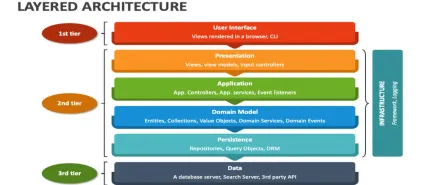
2.2 The “N-Tier” Trap: How traditional horizontal layering leads to “Leaky Abstractions”
The classic layout is familiar:
Controllers/
Services/
Repositories/
Dtos/
Mappings/
It looks orderly, but it often produces feature scattering. To understand one use case, you jump across five folders and ten files. Worse, each layer starts leaking concerns into the next. Controllers know persistence quirks. Services return HTTP-shaped errors. Repositories hide business decisions behind convenience methods.
This is the main trap of horizontal layering: technical roles are separated, but feature cohesion is lost. In practice, a single use case becomes a distributed transaction across the codebase. CQRS and vertical slices help because they organize code around change boundaries, not technical categories. MediatR fits this model naturally because each request has a dedicated handler instead of a shared service accumulating unrelated methods.
2.3 Dependency Bloat: The performance and cognitive cost of 15+ constructor injections
A controller with 15 injected dependencies is not only ugly. It is a signal that the class has multiple reasons to change. The runtime overhead of dependency injection itself is usually not the primary issue. The real cost is human: onboarding time, debugging time, test setup, and the inability to tell which dependencies matter to which endpoint.
This is where vertical slices change the unit of composition. A single handler for CreateOrderCommand might need only a database context, a pricing service, and a clock. The GetOrderByIdQueryHandler may need only a read model or Dapper connection. That makes dependencies local and intention-revealing. MediatR was designed for in-process messaging with request/response handlers and behaviors, so it supports this narrower composition model cleanly.
2.4 Identifying “Code Smells” in ASP.NET Core: Primitive Obsession, Hidden Side Effects, and Tightly Coupled Persistence
Three smells show up constantly.
2.4.1 Primitive obsession
When methods accept strings, decimals, and GUIDs for concepts that have business meaning, rules drift everywhere.
public Task ApproveInvoice(Guid invoiceId, string approverRole, decimal limit)A better design introduces intention:
public sealed record ApproveInvoiceCommand(
    InvoiceId InvoiceId,
    ApprovalRole Role,
    Money ApprovalLimit) : IRequest<ErrorOr<InvoiceDto>>;
2.4.2 Hidden side effects
An endpoint appears to “save an order” but also updates stock, publishes an event, writes an audit record, and sends mail. When side effects are hidden inside controller code, operational reasoning becomes guesswork.
2.4.3 Tightly coupled persistence
The controller directly manipulates DbContext, tracks entities, and shapes response DTOs. That locks the HTTP surface to EF Core behavior and makes read optimization difficult later.
These are not cosmetic problems. They are why a single bug fix often turns into a production incident.
3 Deconstructing the Controller: From CRUD to CQRS
3.1 The Single Responsibility Principle at the Method Level
Start smaller than the architecture diagram. Apply SRP to one endpoint. Ask: what is the single responsibility of POST /orders? It is not “validate, calculate, save, notify, audit.” Its responsibility is to accept an HTTP request and delegate the use case.
That leads to the first real refactor:
[HttpPost]
public async Task<IResult> Create(
    CreateOrderRequest request,
    ISender sender,
    CancellationToken ct)
{
    var command = new CreateOrderCommand(
        request.CustomerId,
        request.Items.Select(i => new OrderLineInput(i.ProductId, i.Quantity)).ToList());

    var result = await sender.Send(command, ct);

    return result.Match(
        value => Results.Created($"/api/orders/{value.Id}", value),
        errors => errors.ToProblem());
}
The controller no longer owns business flow. It is an adapter.
3.2 Introducing MediatR: Decoupling the HTTP entry point from business logic
MediatR implements the mediator pattern for .NET and supports request/response handlers plus pipeline behaviors. That makes it a good fit for CQRS-style decomposition where each use case gets one handler.
A command handler looks like this:
public sealed record CreateOrderCommand(
    Guid CustomerId,
    IReadOnlyList<OrderLineInput> Items
) : IRequest<ErrorOr<OrderDto>>;

public sealed class CreateOrderHandler : IRequestHandler<CreateOrderCommand, ErrorOr<OrderDto>>
{
    private readonly AppDbContext _db;
    private readonly IPricingService _pricing;

    public CreateOrderHandler(AppDbContext db, IPricingService pricing)
    {
        _db = db;
        _pricing = pricing;
    }

    public async Task<ErrorOr<OrderDto>> Handle(CreateOrderCommand request, CancellationToken ct)
    {
        var customer = await _db.Customers.FindAsync([request.CustomerId], ct);
        if (customer is null)
            return Error.NotFound("Customer.NotFound", "Customer was not found.");

        var total = await _pricing.CalculateAsync(request.Items, ct);

        var order = Order.Create(customer.Id, total);
        foreach (var item in request.Items)
            order.AddItem(item.ProductId, item.Quantity);

        _db.Orders.Add(order);
        await _db.SaveChangesAsync(ct);

        return new OrderDto(order.Id, order.Total.Amount, order.Status.ToString());
    }
}
This matters because each handler is now small enough to understand in one read and isolated enough to test without spinning up the whole controller.
3.3 Incremental Extraction: Migrating logic to Commands (Writes) and Queries (Reads)
Do not rewrite the whole controller at once. Extract one method at a time.
A practical sequence is:
- Keep the existing route and DTO.
- Introduce
ISender. - Move write logic into a command handler.
- Move read logic into a query handler.
- Keep the controller returning the same HTTP contract.
For reads, do not force EF entities where a projection is better:
public sealed record GetOrderByIdQuery(Guid OrderId) : IRequest<OrderDetailsDto?>;

public sealed class GetOrderByIdHandler : IRequestHandler<GetOrderByIdQuery, OrderDetailsDto?>
{
    private readonly AppDbContext _db;

    public GetOrderByIdHandler(AppDbContext db) => _db = db;

    public Task<OrderDetailsDto?> Handle(GetOrderByIdQuery request, CancellationToken ct) =>
        _db.Orders
           .Where(x => x.Id == request.OrderId)
           .Select(x => new OrderDetailsDto(x.Id, x.Customer.Name, x.Total.Amount, x.Status.ToString()))
           .SingleOrDefaultAsync(ct);
}
That is the first real CQRS payoff. Reads optimize for shape. Writes optimize for invariants.
3.4 Refactoring to Result Patterns: Eliminating try-catch blocks for flow control using FluentResults or ErrorOr
Business failures are not exceptional failures. “Customer not found,” “credit limit exceeded,” and “stock unavailable” are expected outcomes. Libraries like FluentResults and ErrorOr formalize that by returning success-or-error values instead of using exceptions as branch logic. FluentResults describes itself as a lightweight .NET result object for success/failure outcomes, and ErrorOr exposes a discriminated-union-style API for fluent result handling.
Incorrect:
try
{
    await _service.CreateAsync(request, ct);
    return Ok();
}
catch (CustomerNotFoundException ex)
{
    return NotFound(ex.Message);
}
catch (BusinessRuleException ex)
{
    return BadRequest(ex.Message);
}
Recommended:
var result = await sender.Send(command, ct);

return result.Match(
    value => Results.Ok(value),
    errors => errors.ToProblem());
Use exceptions for truly exceptional events: network failures, corrupted state, unavailable infrastructure, or programming defects. For expected domain outcomes, return explicit results. ASP.NET Core already has strong support for consistent API error payloads through Problem Details, which makes mapping domain errors to HTTP responses much cleaner.
4 Declarative Logic with FluentValidation and Minimal APIs
4.1 Moving beyond Data Annotations: Why declarative validation scales better for complex rules
Data annotations are fine for simple shape validation. They start breaking down when rules depend on other fields, external state, or operation context. Minimal APIs in ASP.NET Core can automatically apply validation attributes on bound parameters and request models, which is useful for simple constraints. But once rules become business-aware, FluentValidation is usually the better home.
public sealed class CreateOrderCommandValidator : AbstractValidator<CreateOrderCommand>
{
    public CreateOrderCommandValidator()
    {
        RuleFor(x => x.CustomerId).NotEmpty();
        RuleFor(x => x.Items).NotEmpty();

        RuleForEach(x => x.Items).ChildRules(item =>
        {
            item.RuleFor(i => i.ProductId).NotEmpty();
            item.RuleFor(i => i.Quantity).GreaterThan(0);
        });
    }
}
The gain is not just readability. Validators are independent, composable, and testable without controllers.
4.2 Contextual Validation: Handling different rules for “Create” vs. “Update” without duplicating DTOs
This is where FluentValidation becomes much stronger than attributes. You can express conditional rules with When, apply validators selectively, and avoid duplicating request models just to represent context. FluentValidation documents conditional validation explicitly, including how conditions apply to all preceding validators unless scoped to the current validator.
public sealed class UpsertCustomerCommandValidator : AbstractValidator<UpsertCustomerCommand>
{
    public UpsertCustomerCommandValidator()
    {
        RuleFor(x => x.Name).NotEmpty().MaximumLength(200);

        RuleFor(x => x.Id)
            .Empty()
            .When(x => x.Mode == UpsertMode.Create);

        RuleFor(x => x.Id)
            .NotEmpty()
            .When(x => x.Mode == UpsertMode.Update);

        RuleFor(x => x.CreditLimit)
            .GreaterThanOrEqualTo(0);
    }
}
The trade-off is that the validator now owns part of the use-case contract. That is usually a good trade when the alternative is controller duplication.
4.3 Integration with ASP.NET Core: Automatic validation filtering vs. Manual invocation
FluentValidation supports manual invocation and automatic integration, but its documentation now treats manual validation as the most straightforward and transparent approach, and notes that the older ASP.NET validation pipeline integration is no longer the recommended option.
For controller-heavy legacy code, manual invocation during refactoring is often clearer. For MediatR-based applications, many teams place validation in a pipeline behavior so handlers never execute invalid requests.
public sealed class ValidationBehavior<TRequest, TResponse>
    : IPipelineBehavior<TRequest, TResponse>
    where TRequest : notnull
{
    private readonly IEnumerable<IValidator<TRequest>> _validators;

    public ValidationBehavior(IEnumerable<IValidator<TRequest>> validators)
        => _validators = validators;

    public async Task<TResponse> Handle(
        TRequest request,
        RequestHandlerDelegate<TResponse> next,
        CancellationToken ct)
    {
        var context = new ValidationContext<TRequest>(request);
        var failures = (await Task.WhenAll(_validators.Select(v => v.ValidateAsync(context, ct))))
            .SelectMany(r => r.Errors)
            .Where(f => f is not null)
            .ToList();

        if (failures.Count != 0)
            throw new ValidationException(failures);

        return await next();
    }
}
Later, you can swap the exception for a result-based response if you want validation failures to remain in-band.
4.4 Bridging the Gap: Preparing the Controller to become a “Thin Wrapper” for Minimal APIs in .NET 9
Once the controller only maps HTTP to a request and delegates to ISender, the difference between a controller action and a Minimal API endpoint becomes small. That is the bridge.
app.MapPost("/api/orders", async (
    CreateOrderRequest request,
    ISender sender,
    CancellationToken ct) =>
{
    var command = new CreateOrderCommand(
        request.CustomerId,
        request.Items.Select(i => new OrderLineInput(i.ProductId, i.Quantity)).ToList());

    var result = await sender.Send(command, ct);

    return result.Match(
        value => Results.Created($"/api/orders/{value.Id}", value),
        errors => errors.ToProblem());
});
ASP.NET Core’s Minimal APIs are now positioned by Microsoft as the recommended approach for new API development, while controllers remain fully supported. That makes the “thin wrapper” controller a good intermediate state: it buys you immediate design benefits without forcing a routing-style migration before the team is ready.
5 Advanced Pipeline Behaviors: The “Middle” of MediatR
The next step is to make the middle of the request pipeline work for you instead of against you. Once handlers are small and focused, the remaining duplication usually lives in logging, validation, caching, transactions, and reliability concerns. MediatR’s IPipelineBehavior<TRequest, TResponse> exists for exactly this purpose: it surrounds the handler and lets you add behavior before and after execution without pushing cross-cutting code into controllers or duplicating decorator chains across services. The MediatR interface is intentionally simple: each behavior receives the request, a delegate for the next step, and the cancellation token.
5.1 Mastering MediatR IPipelineBehavior: Implementing cross-cutting concerns without Decorator clutter
A good behavior does one thing, does it consistently, and does not know too much about the request internals. That keeps the pipeline composable. The mistake is to build a “god behavior” that validates, logs, retries, opens transactions, and writes metrics in one class. That recreates the same coupling problem you just removed from the controller.
A clean behavior might stamp correlation data, enrich logs, or enforce conventions around requests that implement marker interfaces. For example, a write command can implement ITransactionalRequest, while cacheable queries can implement ICacheableQuery<T>. The behavior then acts on the contract, not on a specific feature. That keeps the handler focused on the use case, while the behavior stays reusable across slices. MediatR’s request/response and behavior model is explicitly designed to support this kind of separation.
public interface ITransactionalRequest;

public sealed record CreateInvoiceCommand(
    Guid CustomerId,
    decimal Amount) : IRequest<ErrorOr<InvoiceDto>>, ITransactionalRequest;

public sealed class LoggingBehavior<TRequest, TResponse>(
    ILogger<LoggingBehavior<TRequest, TResponse>> logger)
    : IPipelineBehavior<TRequest, TResponse>
    where TRequest : notnull
{
    public async Task<TResponse> Handle(
        TRequest request,
        RequestHandlerDelegate<TResponse> next,
        CancellationToken ct)
    {
        var requestName = typeof(TRequest).Name;
        logger.LogInformation("Handling {RequestName} {@Request}", requestName, request);

        var response = await next(ct);

        logger.LogInformation("Handled {RequestName}", requestName);
        return response;
    }
}
The practical test is simple: if you remove the behavior, the handler should still make business sense. If it does not, the behavior is carrying application logic that belongs in the slice itself. That is the line worth protecting.
5.2 Performance Guardrails: Automated logging, execution timing, and caching behaviors
Pipeline behaviors are also a good place to enforce performance guardrails. Not because every request needs deep instrumentation, but because latency and over-fetching tend to become invisible once handlers are split across dozens of features. A timing behavior gives you a baseline for every request type. A structured logging behavior gives you traceable diagnostics. A caching behavior gives you a consistent way to short-circuit expensive reads. These patterns show up repeatedly in MediatR behavior examples and are widely used because they centralize discipline without hiding the control flow.
A timing behavior is straightforward:
public sealed class PerformanceBehavior<TRequest, TResponse>(
    ILogger<PerformanceBehavior<TRequest, TResponse>> logger)
    : IPipelineBehavior<TRequest, TResponse>
    where TRequest : notnull
{
    public async Task<TResponse> Handle(
        TRequest request,
        RequestHandlerDelegate<TResponse> next,
        CancellationToken ct)
    {
        var sw = Stopwatch.StartNew();
        var response = await next(ct);
        sw.Stop();

        logger.LogInformation(
            "Request {RequestName} completed in {ElapsedMilliseconds} ms",
            typeof(TRequest).Name,
            sw.ElapsedMilliseconds);

        return response;
    }
}
For caching, the key is to keep it query-only and explicit. Do not cache commands. Do not cache anything with ambiguous invalidation semantics. And do not let handlers make ad hoc caching decisions. A simple contract works better:
public interface ICacheableQuery<TResponse>
{
    string CacheKey { get; }
    TimeSpan Duration { get; }
}

public sealed record GetCustomerSummaryQuery(Guid CustomerId)
    : IRequest<CustomerSummaryDto>,
      ICacheableQuery<CustomerSummaryDto>
{
    public string CacheKey => $"customer-summary:{CustomerId}";
    public TimeSpan Duration => TimeSpan.FromMinutes(5);
}

public sealed class CachingBehavior<TRequest, TResponse>(
    IMemoryCache cache)
    : IPipelineBehavior<TRequest, TResponse>
    where TRequest : notnull
{
    public async Task<TResponse> Handle(
        TRequest request,
        RequestHandlerDelegate<TResponse> next,
        CancellationToken ct)
    {
        if (request is not ICacheableQuery<TResponse> cacheable)
            return await next(ct);

        if (cache.TryGetValue(cacheable.CacheKey, out TResponse? cached) && cached is not null)
            return cached;

        var response = await next(ct);
        cache.Set(cacheable.CacheKey, response, cacheable.Duration);
        return response;
    }
}
This matters because it makes cache usage visible in the request contract. Senior teams usually prefer that over sprinkling IMemoryCache or Redis code inside handlers. The behavior becomes the only place that knows how caching is applied, while the request decides whether caching is allowed.
5.3 Transaction Management: Implementing a Unit of Work behavior to ensure ACID properties across a slice
Transactions are where many CQRS refactors either become solid or quietly drift into inconsistency. Once commands are extracted into handlers, it becomes tempting to call SaveChangesAsync three times in one request. That works until one external dependency fails between writes. A transaction behavior keeps a command slice atomic: one request, one transactional boundary, one commit. This aligns well with a Unit of Work style around EF Core or another persistence layer, and it keeps handlers from repeating boilerplate transaction code. The pattern is commonly demonstrated in MediatR behavior examples, including logging, caching, exception handling, and Unit of Work behaviors.
public sealed class TransactionBehavior<TRequest, TResponse>(
    AppDbContext db)
    : IPipelineBehavior<TRequest, TResponse>
    where TRequest : ITransactionalRequest
{
    public async Task<TResponse> Handle(
        TRequest request,
        RequestHandlerDelegate<TResponse> next,
        CancellationToken ct)
    {
        await using var transaction = await db.Database.BeginTransactionAsync(ct);

        var response = await next(ct);

        await db.SaveChangesAsync(ct);
        await transaction.CommitAsync(ct);

        return response;
    }
}
Two constraints matter here. First, only apply the transaction behavior to commands that change state. Second, keep external side effects out of the transaction when they cannot participate in it. Sending an email or publishing to a broker inside the same handler after a commit is where reliability breaks down. That is the handoff point for the outbox pattern.
5.4 The Outbox Pattern: A brief dive into reliable messaging within the pipeline for distributed systems
The outbox pattern solves a common failure mode: the database transaction succeeds, but the event publication fails. Without an outbox, the system state changes locally but downstream systems never hear about it. With an outbox, the same transaction that persists your domain changes also persists a message record. A background publisher later reads those records and sends them to the broker. This turns one fragile “save and publish” step into two reliable phases.
In a vertical slice setup, the handler raises a domain event or accumulates integration messages. The transaction behavior persists the business data and the outbox record together. The publisher then works independently. That means the handler no longer needs to coordinate broker connectivity, retries, or dead-letter behavior. It only declares that something happened.
public sealed class OutboxMessage
{
    public Guid Id { get; init; }
    public required string Type { get; init; }
    public required string Payload { get; init; }
    public DateTime OccurredOnUtc { get; init; }
    public DateTime? ProcessedOnUtc { get; set; }
}

public sealed class PlaceOrderHandler(
    AppDbContext db)
    : IRequestHandler<PlaceOrderCommand, ErrorOr<OrderDto>>
{
    public async Task<ErrorOr<OrderDto>> Handle(PlaceOrderCommand request, CancellationToken ct)
    {
        var order = Order.Create(request.CustomerId, request.Total);
        db.Orders.Add(order);

        db.OutboxMessages.Add(new OutboxMessage
        {
            Id = Guid.NewGuid(),
            Type = "OrderPlaced",
            Payload = JsonSerializer.Serialize(new
            {
                OrderId = order.Id,
                request.CustomerId,
                request.Total
            }),
            OccurredOnUtc = DateTime.UtcNow
        });

        return new OrderDto(order.Id, order.Total, order.Status.ToString());
    }
}
The trade-off is operational, not conceptual. You add a publisher process, monitoring, retry handling, and cleanup for processed messages. But you gain a reliable boundary between your database and your distributed messaging system. In real systems, that trade is usually worth it.
6 Transitioning to Vertical Slice Architecture (VSA)
6.1 The Philosophy of “Growth by Feature, Not by Type.”
Once behaviors are stable, the codebase is ready for a structural change. Vertical Slice Architecture is less about a folder rename and more about a development rule: when a feature grows, it grows inside its slice. You do not add one more DTO to Dtos, one more handler to Handlers, and one more mapper to Mappings. You add everything to the feature that needs it.
That sounds simple, but it changes how teams reason about ownership. A slice becomes the unit of change, review, testing, and failure analysis. When an endpoint breaks, you open one feature folder and see the request, validator, handler, response, and tests together. That is the practical advantage. It lowers navigation cost and makes architectural intent obvious.
6.2 Organizing the Solution: From “Folders by Technical Role” to “Folders by Feature.”
A typical before-and-after structure looks like this:
Before
Application/
  Commands/
  Queries/
  Validators/
  Dtos/
  Mappings/
Web/
  Controllers/

After
Features/
  Orders/
    Create/
      Endpoint.cs
      Command.cs
      Validator.cs
      Handler.cs
      Response.cs
    GetById/
      Endpoint.cs
      Query.cs
      Handler.cs
      Response.cs
  Customers/
    GetSummary/
      Endpoint.cs
      Query.cs
      Handler.cs
      Response.cs
This layout works because it mirrors how work arrives. Nobody asks for a new Dtos folder entry. They ask for “Add order approval,” “Change invoice rules,” or “Expose customer summary.” A feature-first structure lets that work remain local. It also reduces the pressure to create generic abstractions too early, because code stays near the place where its trade-offs are visible.
6.3 Internalizing Dependencies: Why a feature should own its DTOs, Mappers, and Handlers
A slice should own the contracts it exposes. That includes request models, response models, validators, endpoint wiring, and mapping logic specific to the feature. Shared abstractions are still useful, but they should be rare and intentional. Most of the time, a “shared DTO” is just a convenience that quietly couples features together.
For example, OrderSummaryDto used by an admin list endpoint should not automatically be reused by a customer-facing order history endpoint. They might look similar today and drift apart next month. Owning response types inside the slice makes that divergence cheap instead of painful. The same applies to mapping logic. A slice-specific mapper is easier to change than a central mapping profile with dozens of unrelated transforms.
namespace Features.Orders.GetById;

public sealed record Query(Guid OrderId) : IRequest<Response?>;

public sealed record Response(
    Guid Id,
    string CustomerName,
    decimal Total,
    string Status);

public sealed class Handler(AppDbContext db)
    : IRequestHandler<Query, Response?>
{
    public Task<Response?> Handle(Query request, CancellationToken ct) =>
        db.Orders
          .Where(x => x.Id == request.OrderId)
          .Select(x => new Response(
              x.Id,
              x.Customer.Name,
              x.Total.Amount,
              x.Status.ToString()))
          .SingleOrDefaultAsync(ct);
}
This style also makes versioning easier. If one slice needs a different response shape, the change remains local. That is a major operational advantage in long-lived APIs.
6.4 High-Performance Mapping: Replacing AutoMapper with Mapperly (Source Generators) for zero-overhead transformations in .NET 9
Mapping is one of those areas where convenience slowly turns into opacity. AutoMapper made sense for many teams because it reduced repetitive code. But in vertical slices, small local mappings are usually easier to read and easier to profile. Mapperly takes that idea further by generating mapping code at build time with a source generator. Its documentation highlights two practical benefits: minimal runtime overhead and readable generated code that you can inspect directly.
A Mapperly mapper looks like this:
using Riok.Mapperly.Abstractions;

namespace Features.Orders.Create;

[Mapper]
public static partial class OrderMapper
{
    public static partial Response ToResponse(Order order);
}
At build time, Mapperly generates the implementation. That removes runtime reflection and profile scanning from the mapping path. There are trade-offs. Source-generated mapping is stricter, and when a mapping breaks, it often breaks at compile time rather than silently at runtime. In practice, that is usually an improvement. It shifts errors earlier in the lifecycle and makes mappings more visible to reviewers. Mapperly’s project documentation explicitly positions it as a .NET source generator with minimal runtime overhead.
7 Guarding the Architecture: Automated Enforcement
7.1 Roslyn Analyzers: Using StyleCop.Analyzers and SonarAnalyzer to kill technical debt at compile time
Architectures decay when rules are informal. Once the slices are in place, you need friction in the build so regressions become noisy. Roslyn analyzers are one of the cheapest ways to get that. Microsoft’s .NET code-style analysis already supports style rules through EditorConfig, and analyzers extend that idea into naming, maintainability, and bug-prone patterns.
A typical project file setup looks like this:
<ItemGroup>
  <PackageReference Include="StyleCop.Analyzers" Version="1.2.0-beta.556" PrivateAssets="all" />
  <PackageReference Include="SonarAnalyzer.CSharp" Version="10.12.0.118525" PrivateAssets="all" />
</ItemGroup>
The point is not to enable every rule. It is to enforce the rules that protect your architecture: avoid unused dependencies, flag over-complex methods, keep visibility tight, and surface maintainability issues before they reach pull request review.
7.2 Architecture Testing with NetArchTest: Writing unit tests to ensure “Slices” never reference each other
Static analyzers help with code quality, but architecture rules need their own tests. NetArchTest provides a fluent API for asserting conventions and dependencies in .NET assemblies. Its own project description is clear: it is designed to enforce class design, naming, and dependency rules and to run inside standard unit test frameworks and build pipelines.
That makes it a good fit for vertical slice boundaries. For example, you can assert that order feature types do not depend on customer feature internals:
using NetArchTest.Rules;
using Xunit;

public class ArchitectureTests
{
    [Fact]
    public void Orders_Slice_Should_Not_Depend_On_Customers_Slice()
    {
        var result = Types.InAssembly(typeof(Features.Orders.Create.Command).Assembly)
            .That()
            .ResideInNamespace("Features.Orders", useRegularExpressions: true)
            .ShouldNot()
            .HaveDependencyOn("Features.Customers")
            .GetResult();

        Assert.True(result.IsSuccessful);
    }
}
This is where architecture becomes enforceable rather than aspirational. If someone introduces a shortcut dependency across slices, the build tells them immediately.
7.3 Enforcing Coding Standards: Using .editorconfig and C# 13/14 features (Primary Constructors, Required Members) to reduce boilerplate
EditorConfig is the foundation for consistent style in modern .NET projects. Microsoft’s code-style documentation and rule options documentation both treat EditorConfig as the standard way to control formatting and style analyzers.
root = true

[*.cs]
dotnet_style_qualification_for_field = false:suggestion
dotnet_style_qualification_for_property = false:suggestion
dotnet_diagnostic.IDE0005.severity = warning
dotnet_diagnostic.SA1200.severity = warning
dotnet_diagnostic.SA1309.severity = none
csharp_style_var_when_type_is_apparent = true:suggestion
Modern C# features help reduce ceremony inside slices. Primary constructors reduce repetitive dependency assignment in handlers, and required members make response and configuration objects harder to instantiate incorrectly. Microsoft’s C# reference documents the required modifier and notes how constructors that initialize required members interact with SetsRequiredMembers.
public sealed class GetInvoiceHandler(AppDbContext db)
    : IRequestHandler<GetInvoiceQuery, InvoiceResponse?>
{
    public Task<InvoiceResponse?> Handle(GetInvoiceQuery request, CancellationToken ct) =>
        db.Invoices
          .Where(x => x.Id == request.InvoiceId)
          .Select(x => new InvoiceResponse
          {
              Id = x.Id,
              Number = x.Number,
              Total = x.Total
          })
          .SingleOrDefaultAsync(ct);
}

public sealed class InvoiceResponse
{
    public required Guid Id { get; init; }
    public required string Number { get; init; }
    public required decimal Total { get; init; }
}
The point is not to chase language novelty. It is to reduce repetitive code so the important parts of the slice stand out more clearly.
7.4 Breaking the Build: Integrating architectural checks into the CI/CD pipeline
The final step is to make these checks non-optional. An analyzer that runs only in an IDE is advice. An architecture test that runs in CI is policy. That difference matters when multiple teams contribute to the same solution.
A minimal pipeline should restore, build with warnings treated seriously, run tests, and fail on architecture violations. The same build also becomes the right place to generate code quality reports and enforce formatting consistency.
name: ci

on:
  pull_request:
  push:
    branches: [ main ]

jobs:
  build:
    runs-on: ubuntu-latest

    steps:
      - uses: actions/checkout@v4

      - uses: actions/setup-dotnet@v4
        with:
          dotnet-version: 9.0.x

      - name: Restore
        run: dotnet restore

      - name: Build
        run: dotnet build --configuration Release /warnaserror

      - name: Test
        run: dotnet test --configuration Release --no-build
At that point, the architecture stops depending on memory and good intentions. The codebase begins defending itself. That is one of the biggest practical gains of moving from clean code advice to a real vertical slice architecture.
8 Modern Testing Strategies for Vertical Slices
By this point, the architecture is only as good as its feedback loop. Vertical slices reduce the blast radius of change, but they also shift the testing conversation. Instead of asking whether every service is mocked correctly, the more useful question is whether each slice behaves correctly when its real dependencies, validation rules, pipeline behaviors, and persistence logic are all in play. That is why the testing strategy needs to move closer to the actual execution path. Libraries like NSubstitute, Bogus, Testcontainers for .NET, and Verify fit well here because they support different levels of confidence without forcing the old controller-service-repository testing habits back into the codebase.
8.1 The Testing Pyramid Reimagined: Why Integration Tests are king in VSA.
In a traditional layered application, teams often lean heavily on unit tests because too much logic sits in shared services and helper classes. In a vertical slice architecture, the most valuable thing to test is the slice itself: request binding, validation, pipeline behaviors, persistence, and response shape working together. That does not make unit tests unimportant. It changes their priority. The center of gravity moves toward integration tests because that is where most architectural mistakes show up first. Testcontainers for .NET is explicitly built around throwaway infrastructure for tests, which makes this style practical instead of theoretical.
A good slice integration test usually exercises one endpoint or one MediatR request end to end with real infrastructure and minimal stubbing. That catches issues that unit tests miss: EF Core mapping drift, transaction behavior mistakes, serialization surprises, and invalid assumptions about caching or outbox writes. It also aligns with the architecture itself. A slice is a unit of behavior, so it should also be a unit of verification. This is a better match than writing ten tiny tests around internal implementation details and still missing the fact that the endpoint returns the wrong contract.
A practical testing split in VSA is usually three layers. A small number of fast unit tests for pure logic or tricky branching. A broad set of slice integration tests that hit real storage and real pipelines. And a smaller number of end-to-end tests for critical cross-system flows. That is still a pyramid, but flatter in the middle than many teams are used to. The reason is simple: once handlers are already small, the return on isolated mocking drops while the return on realistic verification rises.
8.2 Unit Testing Handlers: Mocking dependencies with NSubstitute and generating data with Bogus.
There are still cases where isolated handler tests are the right choice. A handler with complex branching around domain rules, but few infrastructure concerns, is often faster to verify with a focused unit test. NSubstitute works well here because it is designed around Arrange-Act-Assert and supports substituting interfaces and virtual members without heavy ceremony. Bogus complements it by generating realistic fake data so tests do not collapse into repetitive object setup.
The main rule is to unit test decisions, not framework plumbing. If the handler’s value is in how it chooses between branches, calculates values, or interprets collaborator results, isolate it. If most of the handler’s value comes from EF Core projections, middleware, or transaction boundaries, move up to integration testing instead.
using Bogus;
using NSubstitute;
using Xunit;

public sealed class ApproveInvoiceHandlerTests
{
    [Fact]
    public async Task Should_reject_invoice_when_credit_limit_is_exceeded()
    {
        var repository = Substitute.For<IInvoiceRepository>();
        var creditPolicy = Substitute.For<ICreditPolicy>();

        var faker = new Faker();
        var invoice = Invoice.Create(
            customerId: faker.Random.Guid(),
            total: 25000m,
            createdBy: "test-user");

        repository.GetByIdAsync(invoice.Id, Arg.Any<CancellationToken>())
            .Returns(invoice);

        creditPolicy.IsWithinLimit(invoice.CustomerId, invoice.Total, Arg.Any<CancellationToken>())
            .Returns(false);

        var handler = new ApproveInvoiceHandler(repository, creditPolicy);

        var result = await handler.Handle(
            new ApproveInvoiceCommand(invoice.Id),
            CancellationToken.None);

        Assert.True(result.IsError);
        Assert.Equal("Invoice.CreditLimitExceeded", result.FirstError.Code);
        await repository.DidNotReceive().SaveChangesAsync(Arg.Any<CancellationToken>());
    }
}
Bogus becomes more valuable as slices grow because it keeps test data varied and readable. Instead of hand-crafting ten nearly identical objects, you can express intent with a builder-like faker and override only the fields that matter for the test. That gives you realistic names, IDs, addresses, totals, and dates without mixing production semantics into the fixture setup. Bogus describes itself as a simple fake data generator for C#, F#, and VB.NET, and that is exactly the role it plays best in handler tests.
One caution is worth calling out. Fake data should support the assertion, not hide it. A unit test that depends on random-looking values nobody understands becomes harder to read, not easier. The useful pattern is deterministic fuzz around unimportant fields and explicit values for the few fields that drive the behavior under test.
8.3 Integration Testing with Testcontainers: Spawning real SQL/Redis instances in Docker for bulletproof slice verification.
The most convincing slice tests run against real infrastructure. Testcontainers for .NET is designed for exactly that: creating disposable Docker containers for test dependencies, with support for modules, container builders, and readiness strategies. Its documentation explicitly notes that default “running” state is often not enough and recommends wait strategies to determine when a dependency is actually usable. That matters in test suites because flaky startup timing is one of the fastest ways to make integration tests unpopular.
For an ASP.NET Core API, a common setup is a WebApplicationFactory backed by a real SQL or PostgreSQL container and, when needed, a Redis container for caching behavior. The test host then points its connection strings at those containers during startup. The result is not a simulation of the slice. It is the slice, running against disposable infrastructure that behaves like the real thing.
using DotNet.Testcontainers.Builders;
using DotNet.Testcontainers.Containers;
using Microsoft.AspNetCore.Mvc.Testing;
using Xunit;

public sealed class OrdersApiTests : IAsyncLifetime
{
    private readonly IContainer _postgres =
        new ContainerBuilder()
            .WithImage("postgres:16")
            .WithEnvironment("POSTGRES_USER", "postgres")
            .WithEnvironment("POSTGRES_PASSWORD", "postgres")
            .WithEnvironment("POSTGRES_DB", "appdb")
            .WithPortBinding(5432, true)
            .WithWaitStrategy(Wait.ForUnixContainer().UntilPortIsAvailable(5432))
            .Build();

    private WebApplicationFactory<Program> _factory = default!;

    public async Task InitializeAsync()
    {
        await _postgres.StartAsync();

        var connectionString =
            $"Host=localhost;Port={_postgres.GetMappedPublicPort(5432)};Database=appdb;Username=postgres;Password=postgres";

        _factory = new CustomWebApplicationFactory(connectionString);
    }

    public async Task DisposeAsync()
    {
        await _postgres.DisposeAsync();
        await _factory.DisposeAsync();
    }

    [Fact]
    public async Task POST_orders_should_create_order_and_return_201()
    {
        var client = _factory.CreateClient();

        var response = await client.PostAsJsonAsync("/api/orders", new
        {
            customerId = Guid.NewGuid(),
            items = new[]
            {
                new { productId = Guid.NewGuid(), quantity = 2 }
            }
        });

        Assert.Equal(HttpStatusCode.Created, response.StatusCode);
    }
}
This style pays off because it validates the architecture choices themselves. If a pipeline behavior is registered incorrectly, the test fails. If the container startup is missing a migration, the test fails. If the response serialization changes unexpectedly, the test fails. That is exactly the kind of confidence you want when slices become the main unit of change.
The trade-off is runtime cost. Containers are slower than in-memory doubles, and Docker availability becomes part of the test environment. But that is usually manageable with parallelization, shared fixtures, and a sensible boundary around what counts as a slice test. For business-critical flows, the extra seconds are often much cheaper than the time spent debugging false confidence from over-mocked tests.
8.4 Snapshot Testing: Using Verify to ensure complex JSON responses don’t regress during refactoring.
Snapshot testing is especially useful during large refactors because response contracts often drift in subtle ways. Verify is built for this style of assertion: it serializes complex results, stores them as verified snapshots, and compares future test runs against that baseline. Its project documentation describes it as a snapshot tool for complex models and documents, and that is a good fit for API responses, event payloads, and structured error objects.
This is not a replacement for semantic assertions. It is a way to catch contract drift that a handful of Assert.Equal statements will miss. For example, when a refactor changes enum casing, property ordering, or nested object structure, snapshot tests surface the difference immediately. They are especially effective when paired with slice integration tests that exercise the full HTTP response.
using VerifyXunit;
using Xunit;

[UsesVerify]
public sealed class OrderResponseSnapshotTests
{
    [Fact]
    public async Task GET_order_by_id_should_match_verified_contract()
    {
        var response = new
        {
            id = Guid.Parse("11111111-1111-1111-1111-111111111111"),
            customerName = "Acme Manufacturing",
            total = 1250.75m,
            status = "Approved",
            items = new[]
            {
                new { sku = "PRD-1001", quantity = 2, unitPrice = 500.25m },
                new { sku = "PRD-1002", quantity = 1, unitPrice = 250.25m }
            }
        };

        await Verify(response);
    }
}
The main discipline with snapshot tests is scope. Use them for stable, meaningful outputs, not volatile ones. Timestamps, random IDs, correlation tokens, and environment-specific values should be scrubbed or normalized before verification. Otherwise the test suite becomes noisy and people stop trusting it. When used carefully, snapshots become a strong safety net for incremental modernization because they tell you when a response changed, even if nobody thought to write a direct assertion for that property.
9 Quantitative Success: Metrics and Final Comparisons
A refactoring like this needs more than architectural preference behind it. Senior teams usually need evidence that the code became easier to maintain, less coupled, and operationally safer. That evidence does not have to be elaborate, but it should be concrete. Code metrics, coupling metrics, and repeatable benchmarks are useful here because they turn “cleaner” into something you can inspect, trend, and discuss with other leads. Visual Studio’s code metrics guidance explicitly covers cyclomatic complexity and maintainability index, and BenchmarkDotNet exists to make performance experiments reproducible rather than anecdotal.
9.1 Measuring Complexity: Analyzing Cyclomatic Complexity and Maintainability Index (Before vs. After).
Cyclomatic complexity is one of the simplest ways to show why a fat controller needed to be broken apart. Microsoft’s code metrics documentation describes higher cyclomatic complexity as a sign that code is harder to test, maintain, and troubleshoot. Maintainability index is a separate measure, normalized to a 0–100 range in Visual Studio, and higher values indicate code that is relatively easier to maintain. Microsoft’s documentation also notes that the maintainability index calculation incorporates lines of code, program volume, and cyclomatic complexity.
In practice, you do not need to chase perfect numbers. The useful comparison is before and after. A 2,000-line controller action with nested branching, inline validation, persistence calls, and side effects might show high complexity and a poor maintainability score. After refactoring, the controller often drops close to trivial complexity, while each handler stays small enough to reason about. Some handlers may still be moderately complex, but the important difference is that complexity becomes localized.
A simple internal metrics report might look like this:
Before
OrdersController.Create()         CC: 28   MI: 11
OrdersController.Approve()        CC: 24   MI: 14

After
CreateOrderEndpoint.Handle()      CC: 2    MI: 86
CreateOrderHandler.Handle()       CC: 7    MI: 71
ApproveOrderHandler.Handle()      CC: 6    MI: 74
The point is not that every method becomes tiny. The point is that no single method remains the only place where the business process can be understood, modified, and broken.
9.2 Afferent and Efferent Coupling: Proving the reduction in “Side Effect” risk.
Coupling metrics are useful because they make architectural risk visible. NDepend’s metrics documentation defines afferent coupling as the number of external types that depend on types inside an assembly, and efferent coupling as the number of external types that types inside the assembly use. High efferent coupling is a warning sign that a unit depends on too many outside concerns. In a fat controller, that usually shows up as direct dependencies on repositories, mappers, services, caches, mail senders, and external clients all at once.
After moving to vertical slices, coupling does not disappear, but it becomes narrower and more intentional. A write slice may still depend on persistence and a domain policy. A read slice may depend on a read model and mapping. What disappears is the giant HTTP entry point that knows about everything. That directly reduces side-effect risk because fewer changes force you to understand or retest unrelated collaborators.
A small comparison matrix is often enough to make the case:
Before
OrdersController Ce: 17
InvoiceController Ce: 14

After
Features.Orders.Create Ce: 5
Features.Orders.GetById Ce: 3
Features.Invoices.Approve Ce: 4
That is not just cleaner design. It means a change in mail delivery or caching is less likely to break approval logic that should not care about either of those concerns.
9.3 Performance Benchmarks: Comparing the memory footprint of MediatR pipelines vs. direct Service calls.
Performance is one of the most common objections to MediatR and slice-based dispatch. The right answer is not to argue from instinct. It is to measure. BenchmarkDotNet exists specifically to run reliable, reproducible microbenchmarks for .NET code, and its documentation emphasizes repeatable measurement rather than ad hoc stopwatch tests.
In most line-of-business APIs, the overhead of a MediatR pipeline is usually small relative to database calls, network latency, and serialization. But that should still be demonstrated in your own codebase, especially if a request passes through several behaviors. The benchmark should compare realistic handler execution paths: direct service invocation versus MediatR dispatch with the same dependencies and the same payload size.
using BenchmarkDotNet.Attributes;
using BenchmarkDotNet.Running;
using MediatR;

[MemoryDiagnoser]
public class DispatchBenchmarks
{
    private readonly IMediator _mediator;
    private readonly IOrderService _service;
    private readonly CreateOrderCommand _command;

    public DispatchBenchmarks()
    {
        _service = new OrderService();
        _mediator = MediatorFactory.Create();
        _command = new CreateOrderCommand(Guid.NewGuid(), new[] { new OrderLineInput(Guid.NewGuid(), 2) });
    }

    [Benchmark]
    public Task<OrderDto> DirectServiceCall() =>
        _service.CreateAsync(_command);

    [Benchmark]
    public Task<OrderDto> MediatorPipelineCall() =>
        _mediator.Send(_command);
}

public static class Program
{
    public static void Main(string[] args) =>
        BenchmarkRunner.Run<DispatchBenchmarks>();
}
What matters most is not the absolute number. It is whether the overhead is acceptable for the use case. In many enterprise APIs, the answer is yes. And when the measured cost is small compared with the maintainability gain, the benchmark becomes a useful artifact for design discussions instead of an abstract argument.
9.4 Conclusion: The Roadmap for Senior Leads to evangelize “Clean Architecture” in legacy environments.
The practical path is rarely a rewrite. Start with one painful controller. Extract one command and one query. Add validation that lives with the use case. Move shared technical concerns into pipeline behaviors. Group files by feature. Then lock the shape in place with architecture tests, analyzers, and CI gates. That sequence works because it produces value at each step instead of requiring a big-bang migration.
For senior developers and tech leads, the real job is not only to refactor code. It is to create a repeatable modernization pattern that other teams can adopt without argument every time. Metrics help. Benchmarks help. Slice-level tests help even more because they prove the architecture still behaves correctly while the structure changes underneath it. Over time, that combination is what turns “clean architecture” from an opinion into an operating model.
That is the real finish line. Not a prettier folder tree. Not more patterns on a diagram. A codebase where features are easier to change, easier to verify, and less likely to surprise the team in production.