1 The Hybrid Reality: Scenario Definition and Architecture Goals
Most enterprises don’t live in a single environment anymore. They run a mix of legacy systems that can’t easily move to the cloud and modern applications that depend on Azure PaaS services. These systems need to talk to each other reliably and securely. Hybrid cloud isn’t a trend for these organizations—it’s their operating model. And once you add VNETs, Private Endpoints, App Service integration, and express routes across regions, the architecture becomes complex quickly.
This section sets a practical foundation by walking through a realistic modernization story at a fictional enterprise, MegaCorp. With that context, we can then explain the security expectations and the network building blocks required to connect on-prem systems to Azure safely and consistently.
1.1 The Reference Scenario: “MegaCorp” Modernization
MegaCorp is in the middle of a long-term modernization effort. Like many enterprises, they can’t shut down legacy systems overnight. Instead, they run new apps in Azure while older services continue operating on-prem. This creates natural pressure to build a hybrid network that is both reliable and secure.
1.1.1 On-Prem: Legacy .NET Framework 4.8 Windows Service
MegaCorp’s legacy workload is a .NET Framework 4.8 Windows Service that aggregates data from several internal systems. It pulls information from shared folders, proprietary hardware, and older internal APIs. For business and operational reasons, the service must remain on-prem.
Key characteristics:
- Runs on physical Windows Server 2016 machines.
- Depends on internal DNS for service discovery.
- Uses classic
app.configsettings and SQL authentication. - Has no built-in network resiliency for outages or fluctuating latency.
Despite being on-prem, this service needs to send data to Azure and occasionally query Azure SQL. And the company’s security policy is clear: no public endpoints, no traffic over the open internet.
1.1.2 Azure PaaS: SQL Database, Key Vault, and .NET 8 App Service API
The modernization team has already built new components in Azure:
- Azure SQL Database (Business Critical) to replace an aging on-prem database.
- Azure Key Vault to centralize secrets and enable Managed Identity authentication.
- Azure App Service (.NET 8) that exposes a private API for ingesting on-prem data.
These PaaS resources simplify operations but introduce networking challenges. By default, PaaS services don’t live inside a VNET. They’re global resources that must be explicitly integrated with your network using Private Link. Each service also behaves differently in terms of DNS and routing, so the architecture needs to account for those differences from day one.
1.1.3 The Goal: Secure, Private Hybrid Communication
MegaCorp’s core requirement looks simple, but the implementation is not:
The on-prem Windows Service must:
- Send data to the Azure App Service API,
- Query Azure SQL directly,
- Without ever touching the public internet,
- Without enabling public endpoints,
- While enforcing Zero Trust principles.
To achieve this, the final architecture must combine:
- A private physical connection (VPN or ExpressRoute)
- A well-structured VNET topology with subnets, NSGs, and routing
- Private Endpoints for SQL and Key Vault
- DNS rules that allow on-prem systems to resolve Private Link domains correctly
Most hybrid architectures fail at the intersection of identity, routing, and DNS. Getting all three aligned is the key to a secure and functional solution.
1.2 The Security Mandate: Zero Trust Networking
Zero Trust often gets treated like a slogan. In practice, it means you no longer assume “internal = safe.” Every request—no matter where it comes from—must be authenticated, authorized, and validated. This mindset is essential when connecting on-prem systems to cloud resources.
1.2.1 Why Public Endpoints Are a Security Violation
Azure services often offer public endpoints with optional IP allowlists. Examples include:
- Azure SQL’s “Allow Azure services…” setting
- Key Vault’s public access with firewall rules
- The default public URL for App Services
These endpoints seem harmless, but they undermine Zero Trust:
- They are reachable from anywhere unless carefully restricted.
- IP allowlists drift and cannot reliably protect against dynamic outbound ranges.
- Public exposure expands the attack surface significantly.
If MegaCorp enabled a public endpoint for SQL, traffic would leave the internal network, cross the internet, then re-enter through Azure’s public surface. That breaks every requirement for private routing.
1.2.2 Identity and Network Isolation Together
A secure hybrid environment needs two things working together:
- Identity controls such as Entra ID, Managed Identity, service principals, and OAuth flows
- Network controls such as Private Endpoints, VNETs, NSGs, and private routing
Identity alone isn’t enough. You might authenticate properly, but without network isolation, an attacker could still attempt to reach the service. Network controls limit where traffic can originate and keep communication paths predictable and private.
1.2.3 The Intersection of Identity and VNETs
MegaCorp’s design brings identity and network controls together:
- The App Service uses Managed Identity to authenticate into SQL and Key Vault.
- SQL and Key Vault are only reachable through Private Endpoints.
- App Service connects to the VNET through a delegated subnet.
- On-prem traffic reaches Azure through the private tunnel only.
The result is an architecture where:
- Only authenticated identities can access the services,
- Only private network paths are allowed,
- No public IPs or fallback paths exist.
This combination is key to making the hybrid environment secure and predictable.
1.3 Architecture Overview
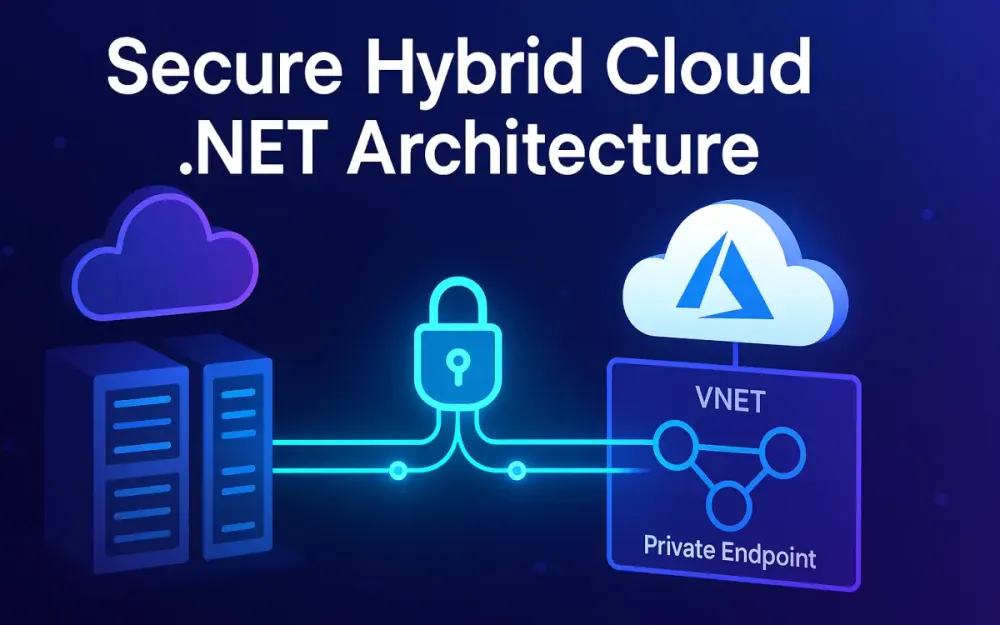
MegaCorp’s final design can be understood as three interconnected layers, all meeting at the VNET boundary.
1.3.1 Identity Layer
- App Service uses a system-assigned Managed Identity.
- Azure SQL is configured for Entra ID authentication where possible.
- The on-prem Windows Service still uses SQL credentials but only via private network paths.
1.3.2 Network Layer
-
A site-to-site VPN or ExpressRoute connection terminates in a hub VNET.
-
Spoke VNETs contain the work-specific subnets:
- App Service integration subnet
- SQL Private Endpoint subnet
- Key Vault Private Endpoint subnet
All communications stay inside private IP ranges.
1.3.3 Application Layer
- The Windows Service sends data to the API over the private tunnel.
- The Windows Service queries Azure SQL through its Private Endpoint.
- The App Service uses Private Link to reach SQL and Key Vault.
These layers create the hybrid connectivity model that the rest of the article builds upon—one that’s private, secure, and architected for long-term maintainability.
2 Establishing the Pipe: Physical Connectivity Options
Before dealing with VNETs, Private Endpoints, or DNS, you need a reliable physical path between on-prem and Azure. Nothing in a hybrid architecture works until the base network connection is stable. This section explains the connectivity options MegaCorp considered, why each one matters, and how they affect the reliability of .NET workloads running across both environments.
2.1 Site-to-Site (S2S) VPN: The Starting Point
A Site-to-Site VPN is usually the quickest way to connect on-prem networks to Azure. It runs over the public internet but encrypts all traffic end-to-end. For teams trying to establish initial connectivity or test a hybrid design, it’s often the first step.
2.1.1 When S2S VPN Makes Sense
MegaCorp chose to begin with an S2S VPN because it allowed them to validate their hybrid architecture without waiting on procurement or telco coordination. VPN is a good fit when:
- You’re running a proof of concept.
- Throughput requirements are moderate (usually under 1 Gbps).
- You need temporary connectivity until ExpressRoute is provisioned.
- You want a backup path in case the primary line fails.
It gives the modernization team a fast way to start moving data from their on-prem Windows Service to the Azure API and SQL database.
2.1.2 Technical Deep Dive: RouteBased VPNs and IKEv2
Azure supports two VPN types, but only RouteBased VPNs should be used for enterprise hybrid environments. They support dynamic routing, multiple tunnels, and coexist with ExpressRoute.
RouteBased VPNs use IKEv2, which provides:
- Stronger encryption suites
- Better resilience to network changes
- Faster tunnel renegotiation
This last point matters more than teams expect. MegaCorp’s .NET Framework Windows Service maintains long-running SQL connections. When a VPN tunnel renegotiates and takes too long, those connections drop and trigger transient SQL errors such as:
SqlException (10060): connection timeoutSqlException (10054): connection was reset
Using a modern IKEv2 RouteBased tunnel reduces these failures dramatically.
2.1.3 Choosing an Azure VPN Gateway SKU
Azure’s VPN Gateway SKUs vary in throughput and availability. MegaCorp selected VpnGw2AZ, which offers:
- Roughly 1 Gbps throughput
- Zone-redundant deployment (“AZ” suffix)
- Full IKEv2 and BGP support
It’s reliable enough for production traffic while ExpressRoute is being prepared. If higher throughput becomes necessary, MegaCorp can scale to VpnGw3AZ or higher.
2.2 ExpressRoute: The Enterprise Standard
Once MegaCorp moves from early testing to full-scale production, ExpressRoute becomes the preferred option. Unlike VPN, ExpressRoute provides private connectivity that never crosses the public internet.
2.2.1 Private Layer 2/3 Connectivity
ExpressRoute uses dedicated links via a carrier or network provider. This gives MegaCorp:
- Predictable latency
- Higher, more stable bandwidth
- No exposure to public internet routing
- Better performance for SQL-heavy and bulk-transfer workloads
For the data ingestion patterns MegaCorp uses—pulling large datasets on a schedule—consistent latency matters more than raw throughput.
2.2.2 Understanding Circuits vs. Gateways
Teams often confuse the role of the ExpressRoute circuit and the VNET gateway.
- The ExpressRoute Circuit is the physical connectivity provisioned by MegaCorp’s carrier to Microsoft.
- The ExpressRoute Gateway is the logical router inside Azure that attaches your VNETs to that circuit.
The actual flow looks like:
On-Prem Router → Provider Edge → ExpressRoute Circuit → ExpressRoute Gateway → Azure VNETUntil the gateway is created and linked to the circuit, the VNET has no usable private connectivity—even if the circuit itself is active.
2.2.3 ExpressRoute FastPath
FastPath improves performance by bypassing the gateway for data-plane traffic. This reduces latency and increases throughput for workloads with heavy data movement. For MegaCorp, FastPath helps stabilize SQL read/write performance, especially during large batch operations where even small latency changes add up over time.
2.3 Coexistence: Using VPN as a Failover
Large enterprises rarely rely on a single connection. MegaCorp maintains both ExpressRoute and VPN so that traffic can automatically fail over if the primary link becomes unavailable.
2.3.1 Enabling Automatic Failover
Azure uses routing priorities—mainly BGP attributes and custom routes—to decide which path is preferred. To make ExpressRoute the primary and VPN the secondary, MegaCorp configured:
- Higher BGP preference (weight) on ExpressRoute
- Lower preference on the VPN tunnel
- No UDRs in the spokes that accidentally override gateway paths
When ExpressRoute goes down:
- BGP withdraws the advertised routes
- Azure automatically considers VPN routes as the next available path
- Traffic flows through VPN without developers changing anything
This is especially helpful for the legacy Windows Service, which wasn’t built with advanced retry logic. Keeping traffic flowing prevents unnecessary job failures during network incidents.
3 The Azure Network Fabric: VNET Integration and Design
Once MegaCorp establishes a physical connection to Azure, the next step is designing the Azure network itself. This is where the shape of the hybrid environment finally comes together: VNETs, subnets, Private Endpoints, App Service integration, and routing. The design must support predictable traffic paths so the on-prem Windows Service and the Azure API can communicate securely and consistently.
A good network layout prevents surprises later—especially around DNS resolution, Private Link behavior, and how traffic flows between spokes.
3.1 Hub and Spoke Topology
MegaCorp uses a hub-and-spoke architecture because it scales well for large environments and keeps workloads isolated while sharing central connectivity.
3.1.1 The Hub VNET
The hub acts as the central point where all hybrid connectivity lands. It contains shared resources that every spoke depends on:
- ExpressRoute and VPN Gateways
- Azure Firewall
- Bastion (if VM access is required)
- Azure Private DNS Resolver (inbound and outbound endpoints)
Anything that needs to be centrally controlled—routing, security inspection, or DNS—is located here. The hub becomes the “crossroads” between on-prem and Azure.
3.1.2 The Spoke VNETs
Each workload lives in its own spoke to maintain separation and reduce blast radius. MegaCorp uses two primary spokes:
- App Spoke for the .NET 8 App Service VNET integration subnet
- Data Spoke for SQL Private Endpoints and Key Vault Private Endpoints
More spokes can be added as other systems move to Azure. Because spokes don’t automatically talk to each other, a misconfiguration in one app can’t accidentally expose another workload. This separation becomes especially important with Private Endpoints, which sit inside the Data Spoke and should only be reachable by approved resources.
3.1.3 Peering
Peering links the hub to each spoke using Azure’s backbone network. Key characteristics:
- Peering is non-transitive (spoke A can’t reach spoke B through the hub unless routing explicitly allows it)
- Peering must be set up in both directions
- Traffic stays within Azure’s private network
MegaCorp created these peerings:
- Hub ↔ App Spoke
- Hub ↔ Data Spoke
Because Private Endpoints live in the Data Spoke, the App Spoke relies on the hub to route traffic correctly to SQL and Key Vault. Without peering or proper routing, the App Service wouldn’t be able to reach the private resources.
3.2 App Service VNET Integration (Regional)
One common misconception is that App Services run inside a VNET. They don’t. Instead, Azure attaches a virtual interface from the App Service environment into a subnet you control. That interface handles outbound traffic into private networks.
3.2.1 How VNET Integration Works
When MegaCorp enabled VNET integration:
- Azure created a virtual NIC for the App Service’s outbound traffic
- The NIC was placed inside a specific subnet delegated for App Service use
- Any traffic destined for private IP ranges (RFC1918) flowed through this VNET path
This allows the App Service to:
- Reach SQL and Key Vault Private Endpoints
- Access on-prem services through the hub
- Avoid using public outbound IPs for internal Azure traffic
It’s a clean model, but it only works if the subnet is configured correctly.
3.2.2 Subnet Delegation
The subnet must be explicitly delegated to:
Microsoft.Web/serverFarmsWithout this delegation, the App Service can’t attach its integration NIC. MegaCorp initially attempted to reuse a shared utility subnet, and the deployment failed until the correct delegation was added.
A working Bicep example:
resource appSubnet 'Microsoft.Network/virtualNetworks/subnets@2023-05-01' = {
  name: 'appservice-integration'
  parent: vnet
  properties: {
    addressPrefix: '10.10.2.0/24'
    delegations: [
      {
        name: 'webappdelegation'
        properties: {
          serviceName: 'Microsoft.Web/serverFarms'
        }
      }
    ]
  }
}
Once this was corrected, Azure created the integration NIC and the App Service could reach SQL’s Private Endpoint without touching public IP space.
3.2.3 Routing Nuances
App Services follow specific routing rules:
- Traffic to private ranges goes through the VNET
- Regular internet traffic uses Azure’s managed NAT gateways
- To force all traffic through on-prem or an NVA, you must apply a UDR with a 0.0.0.0/0 next hop
MegaCorp decided not to force-tunnel everything because their API still needed to reach external SaaS systems without hairpinning through the on-prem firewall. They only routed traffic for Azure SQL, Key Vault, and on-prem ranges through the VNET.
3.3 Network Security Groups (NSGs) and Route Tables (UDRs)
Once VNET integration and peering are in place, MegaCorp still needs guardrails to control traffic and prevent unintended east-west movement. NSGs and UDRs enforce these rules.
3.3.1 NSG Restrictions
MegaCorp’s NSG for the App Service subnet only allows what the API truly needs:
- Outbound TCP 1433 → SQL Private Endpoint subnet
- Outbound HTTPS (443) → Key Vault Private Endpoint
- Outbound to the on-prem IP ranges via the hub
- Block everything else inside private ranges
This keeps the App Service isolated. Even though it has VNET access, it can’t reach other spokes or internal resources it doesn’t need.
3.3.2 Route Tables (UDRs)
UDRs override Azure’s default routing. MegaCorp used them to ensure the App Service always sends SQL, Key Vault, and on-prem traffic through the hub firewall:
10.20.0.0/16(Data Spoke) → next hop: Azure Firewall10.30.0.0/16(on-prem) → next hop: Azure Firewall- No override for
0.0.0.0/0(internet stays direct)
With these UDRs plus the NSGs, the network behaves predictably:
- The App Service can reach SQL, Key Vault, and on-prem systems over private paths
- It cannot talk to unrelated spokes
- Private Endpoint traffic flows through a secured inspection point
This structure makes the environment secure, maintainable, and ready for scaling as MegaCorp adds more Azure workloads.
4 Private Connectivity: Private Endpoints and Private Link
With the base network in place, MegaCorp still needs a way for its on-prem Windows Service and Azure App Service to reach Azure SQL and Key Vault without ever touching the public internet. VNET integration alone isn’t enough because Azure PaaS services don’t live inside a VNET by default. Private Link fills that gap by giving these PaaS services their own private IP addresses inside MegaCorp’s VNET. Once Private Link is enabled, the services behave like internal resources rather than internet-facing endpoints.
This section explains how Private Link works, how MegaCorp configured it for Azure SQL, and what changes developers need to keep hybrid workloads stable and secure.
4.1 Conceptual Shift: PaaS as a NIC
Private Link changes how you think about PaaS services. Instead of seeing Azure SQL or Key Vault as remote cloud services, Private Link lets you treat them like they’re running inside your VNET. Azure creates a network interface (NIC) in your subnet and maps the PaaS resource to that NIC. The service itself still runs in Microsoft’s infrastructure, but every connection—both inbound and outbound—terminates on the private NIC inside your network.
For MegaCorp, this shift is critical. Their App Service and on-prem Windows Service both must reach Azure SQL exclusively over private paths. With Private Link, Azure assigns SQL a private IP such as 10.20.5.6 from the Private Endpoint subnet. From the application’s point of view, connecting to Azure SQL now feels identical to connecting to an internal SQL Server.
This private NIC also gives MegaCorp a place to enforce NSGs, UDRs, and firewall rules. Azure SQL can’t have an NSG attached directly, but the Private Endpoint lives inside a subnet that can. That means MegaCorp can control SQL traffic at the network level without relying on public firewall rules or IP allowlists.
4.2 Configuring Private Endpoints for Azure SQL
Setting up a Private Endpoint for SQL is straightforward, but it’s easy to misconfigure if you don’t understand how Azure routes traffic. MegaCorp ran into this early on when the SQL Server was created with the option “Allow Azure Services and resources to access this server” enabled. While convenient for testing, that setting allows public traffic through Azure’s backbone and bypasses Private Link entirely. To enforce a true private-only posture, MegaCorp disabled public network access on the SQL Server so the Private Endpoint becomes the only valid entry point.
A Private Endpoint consists of two pieces:
- The Private Endpoint resource, which creates a NIC inside your subnet
- A Private DNS configuration, which ensures the SQL hostname resolves to the private IP
Azure automatically creates a NIC with a name like sql-pe-nic-01. You can’t modify this NIC directly; you control access through the subnet’s NSG and routing rules.
Here’s a simplified Terraform example based on MegaCorp’s setup:
resource "azurerm_private_endpoint" "sql_pe" {
  name                = "pe-sql"
  location            = azurerm_resource_group.rg.location
  resource_group_name = azurerm_resource_group.rg.name
  subnet_id           = azurerm_subnet.sql_pe_subnet.id

  private_service_connection {
    name                           = "sql-psc"
    private_connection_resource_id = azurerm_mssql_server.sql.id
    is_manual_connection           = false
    subresource_names              = ["sqlServer"]
  }
}
Once deployed, MegaCorp verified:
- SQL public network access was disabled
- No IP firewall exceptions remained
- The Private Endpoint received a stable private IP
- DNS correctly mapped
mydb.database.windows.net→mydb.privatelink.database.windows.net→10.20.5.6
At this point, all SQL traffic—both from Azure App Service and from the on-prem Windows Service—used the private tunnel and Azure backbone automatically.
4.3 The “Gotcha” of Outbound Connectivity
Private Link solves many problems, but there is one common pitfall: on-prem firewalls often block outbound traffic on port 1433 by default. MegaCorp hit this immediately. The Windows Service attempted to connect to mydb.database.windows.net, DNS resolved to the private IP, but the firewall silently dropped packets destined for 1433. The application only saw generic timeout errors.
Before Private Link existed, teams often whitelisted Azure SQL’s public IPs. Those IPs could change during maintenance, forcing regular updates to firewall rules. With Private Link, the SQL private IP stays stable unless the Private Endpoint is recreated. MegaCorp’s firewall team only needed to allow outbound traffic to a single RFC1918 address (10.20.5.6), which simplified their policies significantly.
MegaCorp also had to account for Azure SQL’s Redirect connection policy. Redirect mode improves performance by allowing the client to connect directly to the SQL compute node, but it uses high-range ports (11000–11999). The on-prem firewall had these ports blocked, so MegaCorp added outbound rules for this range to avoid intermittent connection failures.
If your environment cannot safely allow that port range, “Proxy” mode can be used instead—but MegaCorp preferred the performance benefit of Redirect mode for their ingestion workloads.
4.4 Security Benefits for the .NET Developer
Private Link simplifies your security story and your code at the same time. Developers don’t need to know anything about private IPs, routing, or firewall rules. They connect using the standard SQL hostname, and DNS handles the private resolution automatically.
For MegaCorp’s .NET teams, this meant:
- Removing legacy configuration files filled with public IP allowlists
- Eliminating the risk that a developer accidentally hits SQL over a public endpoint
- Guaranteeing that only workloads inside the private network can reach SQL
- Keeping connection strings clean and predictable
A typical managed-identity-based connection string for .NET 8 looks like:
var connection = new SqlConnection(
    "Server=tcp:mydb.database.windows.net,1433;" +
    "Authentication=Active Directory Default;" +
    "Database=coredb;");
There’s no mention of private IPs. No environment-specific overrides. No guesses about where SQL lives. Azure’s DNS and Private Link handle everything behind the scenes.
The result is a design that is both secure and developer-friendly—exactly what MegaCorp needs to support hybrid workloads over the long term.
5 The Great Resolver: DNS Architecture for Hybrid Scenarios
Once MegaCorp enabled Private Endpoints, they quickly discovered that routing wasn’t the hardest part—DNS was. Most hybrid connectivity failures start as DNS issues that look like network or firewall problems. Azure SQL, Key Vault, Storage, and other PaaS services all behave differently when Private Link is enabled, and Azure expects workloads to resolve their special Private Link domains. If DNS isn’t configured correctly, applications simply cannot reach the private IPs that Private Endpoints rely on.
This section explains why DNS is usually the root cause of hybrid outages and how MegaCorp built a DNS architecture that works equally well for Azure workloads and on-prem systems.
5.1 The Problem: Split-Horizon DNS
By design, Azure SQL’s default hostname (mydb.database.windows.net) resolves to a public IP everywhere in the world. This is correct for clients that don’t use Private Link. But MegaCorp needs the same hostname to map to a private IP for all workloads that run inside the VNET or inside the corporate network.
That means DNS must behave differently depending on where a query originates—a concept known as split-horizon DNS.
MegaCorp’s on-prem Windows Service initially resolved SQL to a public IP because on-prem DNS forwarded everything to public resolvers. The SQL public endpoint was disabled, so the connection failed immediately. Azure App Service, meanwhile, resolved SQL correctly using the Private DNS zone, so it worked. This mismatch caused intermittent and confusing behavior across environments.
A developer running nslookup in the App Service’s Kudu console saw one IP; running the same command on-prem showed a completely different one. Recognizing this difference—same hostname, different expected IP—is the key to understanding hybrid DNS.
5.2 Azure Private DNS Zones
Private DNS zones provide the authoritative mapping for Private Endpoint hostnames. For Azure SQL, the required zone is:
privatelink.database.windows.netWhen MegaCorp created the SQL Private Endpoint, Azure prompted them to set up this zone. They placed the zone in the hub VNET and linked it to both the App Spoke and Data Spoke using Virtual Network Links.
Inside the zone, Azure created a record like:
mydb.privatelink.database.windows.net → 10.20.5.6This record points SQL’s Private Link hostname to the private IP of the Private Endpoint NIC. Azure manages the record, including any updates during SQL maintenance or replica changes.
A simplified Bicep example for the zone and its VNET link:
resource dnsZone 'Microsoft.Network/privateDnsZones@2023-05-01' = {
  name: 'privatelink.database.windows.net'
  location: 'global'
}

resource vnetLink 'Microsoft.Network/privateDnsZones/virtualNetworkLinks@2023-05-01' = {
  name: 'hub-link'
  parent: dnsZone
  properties: {
    virtualNetwork: {
      id: hubVnet.id
    }
    registrationEnabled: false
  }
}
By linking the zone to every VNET that needs to reach SQL, MegaCorp ensured consistent resolution no matter where in Azure the workload runs.
5.3 Azure Private DNS Resolver (The Modern Solution)
In the past, enterprises had to deploy custom DNS forwarder VMs in Azure to bridge DNS between on-prem and the cloud. These VMs were fragile, high-maintenance, and created new failure points. Azure Private DNS Resolver replaces that entire pattern with a managed service.
MegaCorp deployed a resolver inside the hub VNET, giving them a single, scalable DNS bridge between Azure and on-prem.
The resolver uses two types of endpoints:
5.3.1 Inbound Endpoint: On-Prem → Azure DNS
The inbound endpoint is an IP address inside the hub VNET. On-prem DNS servers forward Private Link domains to this IP. When the on-prem Windows Service resolves SQL, the query flows like this:
- On-prem DNS identifies the query as belonging to a Private Link zone
- It forwards the request to the resolver’s inbound endpoint over the VPN/ExpressRoute tunnel
- The resolver checks the Private DNS zone and returns the correct private IP
MegaCorp added this forwarding rule on-prem:
Zone: privatelink.database.windows.net
Forward to: 10.10.0.4   (Private DNS Resolver inbound endpoint)
Once this rule took effect, the Windows Service finally resolved SQL the same way Azure workloads did.
5.3.2 Outbound Endpoint: Azure → On-Prem DNS
The outbound endpoint solves the opposite problem: Azure workloads resolving on-prem DNS names.
MegaCorp’s App Service needed to call internal on-prem APIs that live under:
corp.megacorp.localWithout an outbound rule, Azure cannot resolve these names. MegaCorp configured the resolver to send all *.megacorp.local queries to their on-prem DNS servers using ExpressRoute.
A conceptual rule looks like:
{
  "domainName": "megacorp.local",
  "targetDnsServers": [
    { "ipAddress": "10.30.1.10", "port": 53 },
    { "ipAddress": "10.30.1.11", "port": 53 }
  ]
}
After applying this rule, the App Service could resolve and call the on-prem APIs without any code changes.
5.4 Configuring the DNS Forwarding Ruleset
With the resolver in place, MegaCorp finalized their DNS rules so that SQL, Key Vault, Storage, and all on-prem domains resolved correctly from every environment.
The sequence below shows the full end-to-end flow of how the on-prem Windows Service resolves SQL through Private Link.
5.4.1 Step 1: Application Initiates a SQL Connection
When the Windows Service opens a database connection, the SQL client performs a DNS lookup:
using var conn = new SqlConnection(connectionString);
await conn.OpenAsync();
Before any packet is sent, the client resolves mydb.database.windows.net.
5.4.2 Step 2: On-Prem DNS Receives the Request
The on-prem DNS server receives the query. It’s not authoritative for this domain, so it checks its rules and sees that this domain belongs to a Private Link zone.
5.4.3 Step 3: Query Forwarded to Azure Resolver’s Inbound Endpoint
The DNS query is forwarded through ExpressRoute/VPN to the resolver’s inbound IP (e.g., 10.10.0.4). Because MegaCorp’s routing already allows DNS traffic across the tunnel, the packet reaches Azure without issue.
5.4.4 Step 4: Resolver Checks Private DNS Zones
Azure Private DNS Resolver looks for a matching record in its linked Private DNS zones. It finds mydb.privatelink.database.windows.net and returns the Private Endpoint’s IP:
10.20.5.65.4.5 Step 5: On-Prem DNS Returns and Caches the Private IP
The on-prem DNS server receives the response and caches it based on the TTL. From this point on, repeated SQL connections resolve instantly.
5.4.6 Step 6: Application Connects Over Private Path
The Windows Service opens a TCP handshake to:
10.20.5.6:1433Firewall rules allow the outbound request, the traffic flows through the ExpressRoute/VPN tunnel, and SQL accepts the connection because it matches the Private Endpoint binding.
Even though the connection string still uses the public-looking hostname:
<connectionStrings>
  <add name="CoreDb"
       providerName="System.Data.SqlClient"
       connectionString="Server=tcp:mydb.database.windows.net;Database=coredb;User ID=svc_legacy;Password=REDACTED;" />
</connectionStrings>
…the actual path is fully private, predictable, and compliant with MegaCorp’s Zero Trust requirements.
6 The .NET Implementation: Resilient Code
The network architecture only succeeds if the applications running on top of it behave predictably. Hybrid environments introduce realities that developers don’t usually face in a single-cloud setup: varying latency, tunnel renegotiations, DNS changes during maintenance windows, and momentary packet loss across the private link. Code that seems fine in a dev environment often becomes unstable when running in a live hybrid path.
MegaCorp saw these issues immediately. Their Windows Service experienced intermittent timeouts when the VPN rekeyed. The .NET 8 API occasionally failed SQL handshakes due to DNS drift. Both teams needed code that could tolerate the imperfections of hybrid networks without masking real failures. This section focuses on how MegaCorp hardened their .NET Framework and .NET 8 apps to behave reliably in a hybrid cloud environment.
6.1 Connection Strings and Identity
Hybrid environments demand clean, DNS-driven connection strings. Hardcoding IP addresses, shortcuts, or “temporary” overrides causes real problems once Private Endpoints and TLS are involved.
6.1.1 Why FQDN Must Be Used Instead of IPs
Even though SQL’s Private Endpoint has a private IP like 10.20.5.6, the app should never use that address directly. Azure SQL certificates are issued for names under:
*.database.windows.netIf MegaCorp’s Windows Service tried to connect using the private IP, TLS validation failed because the certificate didn’t match. The result was repeated handshake errors such as:
A connection was successfully established with the server,
but then an error occurred during the pre-login handshake.
Keeping the hostname in the connection string fixes this:
- TLS validates correctly
- Azure SQL can use Redirect/Proxy mode
- DNS automatically routes to the Private Endpoint IP
A correct .NET Framework 4.8 connection string:
<add name="CoreDb"
     connectionString="Server=tcp:mydb.database.windows.net,1433;Database=coredb;User ID=svc_legacy;Password=REDACTED;"
     providerName="System.Data.SqlClient" />
The application knows nothing about the private IP. DNS takes care of everything.
6.1.2 Managed Identity and DefaultAzureCredential
For the .NET 8 API running in App Service, MegaCorp eliminated SQL passwords entirely. Using Managed Identity means the App Service authenticates directly with Azure SQL using tokens—no User ID, no Password, no expiry to track.
A typical pattern in .NET 8:
using Azure.Identity;
using Microsoft.Data.SqlClient;

var credential = new DefaultAzureCredential();

// Request a token for Azure SQL
var token = await credential.GetTokenAsync(
    new Azure.Core.TokenRequestContext(
        new[] { "https://database.windows.net/.default" }));

var builder = new SqlConnectionStringBuilder
{
    DataSource = "mydb.database.windows.net",
    InitialCatalog = "coredb",
    Authentication = SqlAuthenticationMethod.ActiveDirectoryAccessToken
};

using var conn = new SqlConnection(builder.ConnectionString);
conn.AccessToken = token.Token;

await conn.OpenAsync();
MegaCorp granted the App Service’s system-assigned identity database access. With that in place, the API no longer stores credentials in Key Vault or configuration files.
This fits perfectly with MegaCorp’s Zero Trust model—identity-based access with no static secrets.
6.2 Handling Network Transient Faults (Polly)
Hybrid connectivity behaves differently during tunnel renegotiations, routing convergence, or packet loss. SQL clients surface these issues as transient exceptions. Without retry logic, even a healthy system can appear broken.
MegaCorp adopted Polly to add targeted retry logic around SQL operations. The goal wasn’t to hide systemic problems but to tolerate brief, expected disruptions in the hybrid path.
6.2.1 Example Polly Policy
using Polly;
using Polly.Retry;
using Microsoft.Data.SqlClient;

var transientErrors = new[] { -2, 10054, 10060, 40613 };

AsyncRetryPolicy retryPolicy = Policy
    .Handle<SqlException>(ex => transientErrors.Contains(ex.Number))
    .Or<TimeoutException>()
    .WaitAndRetryAsync(
        retryCount: 5,
        sleepDurationProvider: attempt => TimeSpan.FromSeconds(Math.Pow(2, attempt)));

async Task<T> ExecuteWithRetry<T>(Func<Task<T>> action)
{
    return await retryPolicy.ExecuteAsync(action);
}
MegaCorp applied this to all SQL reads and writes. During VPN rekeys or small ExpressRoute blips, the service waited and retried instead of throwing exceptions.
6.2.2 Applying Retry Logic to the Legacy Windows Service
Even the .NET Framework 4.8 codebase can use the same pattern:
var result = await ExecuteWithRetry(async () =>
{
    using var conn = new SqlConnection(connString);
    await conn.OpenAsync();
    // Perform query operations...
});
This small change eliminated nightly job failures caused by brief network interruptions.
6.3 HttpClient Factory & DNS TTL
In hybrid environments, DNS is as important as routing. If a Private Endpoint IP changes during maintenance, clients need to refresh DNS regularly. A common problem is creating a singleton HttpClient that never re-resolves DNS.
MegaCorp hit this when a Private Endpoint was recreated, and the App Service kept calling the old IP for hours.
6.3.1 The Danger of DNS Caching in Singletons
A long-lived HttpClient keeps TCP connections alive. Those connections use the old DNS resolution until the connection pool is refreshed. Without intervention, your app can silently talk to a stale IP.
6.3.2 Using PooledConnectionLifetime in .NET 8
To avoid stale DNS, MegaCorp configured the HttpClient’s handler:
builder.Services.AddHttpClient("InternalService")
    .ConfigurePrimaryHttpMessageHandler(() =>
        new SocketsHttpHandler
        {
            PooledConnectionLifetime = TimeSpan.FromMinutes(5),
            PooledConnectionIdleTimeout = TimeSpan.FromMinutes(1)
        });
This ensures:
- DNS is re-resolved every few minutes
- Old IP addresses naturally retire
- The API adapts automatically to Endpoint changes
MegaCorp stopped seeing DNS-related outages after enabling this.
6.4 SQL Client Redirect Policy
Azure SQL supports two connection policies: Proxy and Redirect. Redirect is the default and usually the fastest because clients connect directly to the assigned SQL compute node.
But Redirect requires outbound access to ports 11000–11999. On-prem firewalls often block these ports, including MegaCorp’s.
6.4.1 When Redirect Mode Causes Issues
When MegaCorp first attempted Redirect mode from on-prem, SQL handshake errors appeared:
A network-related or instance-specific error occurred while establishing a connection to SQL Server.The initial gateway handshake succeeded, but the redirect target port was blocked, and the connection died.
6.4.2 Switching to Proxy Mode on On-Prem Systems
To make the Windows Service reliable, MegaCorp configured it to use Proxy mode:
var builder = new SqlConnectionStringBuilder(connString)
{
    ConnectPolicy = SqlConnectionConnectPolicy.Proxy
};
Proxy mode routes everything through port 1433, which was already open on the firewall. It adds a few milliseconds of latency but dramatically improves reliability for on-prem-to-cloud SQL connections.
Azure App Service, which isn’t constrained by on-prem firewalls, continued using Redirect mode for best performance.
7 The “It Works on Dev” Troubleshooting Guide
Hybrid systems fail differently than cloud-only systems. Problems that look like SQL failures often turn out to be DNS or routing issues. And because dev environments rarely include VPN tunnels, Private Endpoints, or strict firewall rules, most issues only appear once traffic flows through the real hybrid path. MegaCorp went through this during deployment—everything worked in dev, but production showed dropped packets, public DNS lookups, and blocked SQL redirects.
This section focuses on practical, repeatable steps MegaCorp used to troubleshoot hybrid connectivity issues in real time.
7.1 Validating the Path
The first step is always verifying whether traffic can reach the target resource at all. Azure provides several tools that make this much easier.
7.1.1 Using Kudu Console Inside App Service
Kudu is one of the most useful debugging tools for App Service. It allows you to test DNS and TCP connectivity from inside the same sandbox the app runs in.
From the Kudu SSH console:
Check DNS resolution:
nameresolver mydb.database.windows.netCheck TCP connectivity:
tcpping mydb.database.windows.net 1433What MegaCorp learned quickly:
- If DNS returns a public IP, the App Service is not resolving via the Private DNS zone.
- If
tcppingfails but DNS resolves correctly, the problem is usually NSG rules, UDRs, or missing VNET integration. - If both succeed, the issue is probably inside the application code or authentication layer—not the network.
7.1.2 Using Azure Network Watcher
Network Watcher provides a deeper look when testing from the App Service itself isn’t enough. MegaCorp relied on a few key features:
- IP Flow Verify — Tells you if a packet is allowed or blocked by NSGs.
- Next Hop — Shows exactly where Azure routes traffic (useful for spotting missing UDRs or wrong gateway paths).
- Connection Troubleshoot — Attempts an actual connection between two resources and surfaces where the path breaks.
MegaCorp used Next Hop often when confirming whether App Service traffic was correctly routed to the hub firewall or accidentally bypassing it to the public internet. This tool exposed several misconfigured UDRs early in their rollout.
7.2 The DNS / NSlookup Check
Most hybrid connectivity failures trace back to DNS. The only real way to confirm DNS behavior is to check resolution from both sides—on-prem and Azure.
7.2.1 Verifying On-Prem Resolution
On the Windows Server running the legacy .NET Framework service:
nslookup mydb.database.windows.netExpected, correct response:
Name: mydb.privatelink.database.windows.net
Address: 10.20.5.6
If it returns a public IP instead:
- The on-prem DNS forwarder isn’t sending Private Link zones to the Azure DNS Resolver.
- The resolver’s inbound endpoint may be unreachable.
- A firewall may be blocking outbound DNS to the resolver.
MegaCorp discovered this early—on-prem DNS was still forwarding to public resolvers, which made SQL appear “offline” even though the private link worked perfectly in Azure.
7.2.2 Verifying Azure Resolution (App Service)
From Kudu:
nslookup mydb.database.windows.netThis output should match the on-prem result. If Azure resolves to the private IP but on-prem resolves to a public IP, the issue is isolated to the on-prem side.
This is one of the fastest ways MegaCorp split DNS issues from network issues.
7.3 Firewall Logs
When the network path looks right and DNS looks right, firewall logs usually reveal the last missing piece. Hybrid paths cross multiple control points—on-prem firewalls, Azure Firewall, and potentially NVAs. Silent drops are common.
7.3.1 On-Prem Firewall Logs
MegaCorp’s on-prem firewall logs were essential. They revealed:
- Outbound TCP 1433 being blocked from specific subnets
- High-range SQL Redirect ports (11000–11999) being dropped
- DNS attempts to
10.10.0.4(the Private Resolver inbound endpoint) denied - Occasional MTU fragmentation warnings on the VPN tunnel
The redirect port issue was particularly problematic. The team initially thought SQL was unstable, but the logs showed the firewall dropping the secondary connections required by Redirect mode.
Once the appropriate outbound rules were added, the SQL connectivity issues stopped.
7.3.2 Azure Firewall Logs
Azure Firewall logs in Log Analytics helped MegaCorp confirm Azure-side behavior:
- App Service traffic was consistently reaching the hub firewall
- DNS queries were flowing correctly to the resolver
- SQL Private Endpoint traffic was allowed (proving Azure wasn’t the source of the block)
- On-prem traffic occasionally never arrived, confirming the drop occurred before Azure
By combining on-prem firewall logs with Azure Firewall insights, MegaCorp could trace dropped packets end-to-end. This dual perspective was often the only reliable way to pinpoint the exact failure.
8 Cost Analysis and Summary
Hybrid architectures bring strong security and predictable routing, but they come with real operational costs. MegaCorp learned this early in their rollout: the more isolation you introduce—Private Endpoints, VNET integration, DNS resolvers, ExpressRoute—the more the monthly bill grows. None of these services are “expensive” on their own, but together they form a meaningful part of the overall architecture budget.
This section highlights the cost areas MegaCorp evaluated and the checklist they used before moving into production.
8.1 The Price of Isolation
Each part of the hybrid design contributes to the monthly spend. These costs aren’t hidden, but teams often underestimate them until the first invoice arrives.
8.1.1 VNET Peering
Peering costs are usually minor but constant. Azure charges for:
- Data transferred between hub and spokes
- Additional charges for cross-region peering (if used)
For MegaCorp, the hub-and-spoke pattern kept things clean, but also ensured that all Private Endpoint traffic passed through the hub, which generated steady peering usage.
8.1.2 VPN or ExpressRoute Gateways
Gateway SKUs can easily become one of the higher recurring costs.
- VPN gateways like VpnGw2AZ bill hourly and offer no bundled data allowance.
- ExpressRoute gateways have higher throughput and reliability but come with larger hourly costs.
- ExpressRoute circuits also require charges from the connectivity provider, not just Azure.
For MegaCorp, the combination of ExpressRoute + VPN failover meant running two gateways simultaneously, which doubled this portion of the bill.
8.1.3 Private Endpoints
Private Endpoints seem lightweight, but each one:
- Bills per hour
- Charges additional per-GB processing fees
MegaCorp needed Private Endpoints for SQL, Key Vault, and Storage, and later added one for a partner API. The pattern is secure and clean, but each Private Endpoint contributes to the overall cost.
8.1.4 Private DNS Resolver
Private DNS Resolver became the biggest surprise for MegaCorp’s finance team.
The resolver is billed based on:
- The inbound and outbound endpoints provisioned
- The number of DNS queries processed
Because Private DNS Resolver replaced their old forwarder VMs, MegaCorp didn’t mind the higher cost, but it quickly became one of the most expensive items in the network layer.
8.2 Checklist for Go-Live
Before enabling production traffic, MegaCorp reviewed a checklist covering networking, Private Link, DNS, and application posture. This helped catch the small but critical misconfigurations that often cause outages.
Networking
- App Service integration subnet delegated to
Microsoft.Web/serverFarms - Hub–spoke VNET peering configured in both directions
- NSGs allowing only required outbound paths (SQL, Key Vault, on-prem)
- UDRs routing Private Endpoint traffic to the hub firewall
Private Link
- Private Endpoints created for SQL, Key Vault, and Storage
- Public network access disabled on all PaaS resources
- Private DNS zones linked to every relevant VNET (hub + spokes)
DNS
- On-prem DNS servers forwarding Private Link zones to the resolver’s inbound endpoint
- Forwarding rule for
privatelink.database.windows.netin place - Outbound resolver rules configured for
*.megacorp.local(on-prem discovery)
Application
- Managed Identity enabled for the .NET 8 API
- Retry policies implemented with Polly for SQL operations
PooledConnectionLifetimeset on HttpClient- SQL Proxy/Redirect mode chosen based on on-prem firewall rules
This checklist became the standard for every new hybrid workload MegaCorp added into Azure.
8.3 Future Proofing
MegaCorp’s next step is onboarding their on-prem servers into Azure Arc. This helps them close the gap between their Azure-native and on-prem workloads.
Azure Arc gives them:
- Consistent policy enforcement across both environments
- Managed Identity support for on-prem machines
- Centralized monitoring, log collection, and update management
With Arc in place, the Windows Service can eventually authenticate to Azure without storing any secrets, and operations teams can manage the entire hybrid estate through the same Azure governance model. For MegaCorp, this is the final stage of moving their “hybrid workaround” into a long-term, stable hybrid operating model.