1 The Modern Request Pipeline: Architecture and .NET Evolution
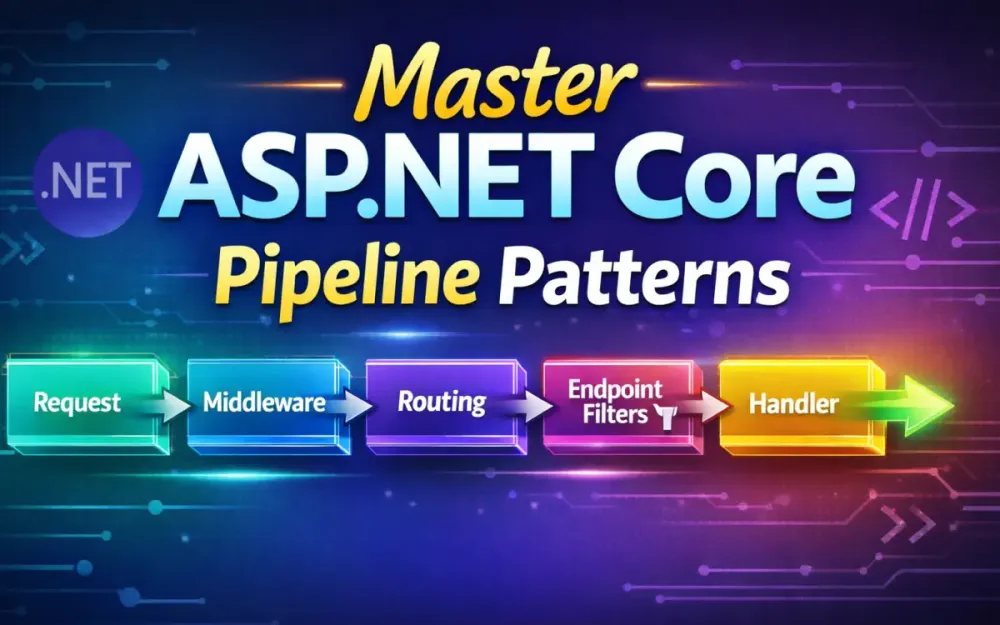
The ASP.NET Core request pipeline is the framework’s execution backbone. Every HTTP request flows through a well-defined sequence—middleware, routing, filters, model binding, and finally an endpoint that produces a response. Understanding this flow determines where you enforce security, how you apply cross-cutting concerns, and how predictable your system is under load.
This article builds a clear mental model of how the pipeline behaves at runtime, explains how middleware and endpoint filters work together, and shows how to use them deliberately to build production-grade APIs.
1.1 The “Russian Doll” Model: Understanding the Bidirectional Flow
A reliable way to think about the ASP.NET Core pipeline is as a nested stack, similar to a set of Russian dolls. Each middleware wraps the next one. Requests travel inward toward the endpoint; responses unwind outward through the same layers.
1.1.1 Inbound and Outbound Execution
Every middleware follows a consistent execution shape:
public async Task InvokeAsync(HttpContext context)
{
    // inbound logic
    await _next(context);
    // outbound logic
}
The code before _next runs on the way into the pipeline. The code after _next runs on the way out. This structure is what enables middleware to both observe and influence requests and responses.
This dual execution model makes common patterns possible:
- logging request details before routing occurs
- measuring total execution time after the endpoint completes
- wrapping the entire pipeline in a single error handler
- attaching correlation IDs early and emitting them on the response
Because every middleware executes twice, placement is critical. A logging middleware placed before authentication will see unauthenticated requests. The same middleware placed after authentication will not. These are not subtle differences—they materially change system behavior.
1.1.2 Why Short-Circuiting Matters
Middleware is not required to call _next(context). When it doesn’t, the pipeline stops immediately.
if (!context.Request.Headers.ContainsKey("X-App-Key"))
{
    context.Response.StatusCode = StatusCodes.Status401Unauthorized;
    return;
}
This pattern is intentional and heavily used in real systems. Short-circuiting is appropriate when further processing is pointless or unsafe—rejecting requests that exceed rate limits, blocking unauthenticated traffic, responding to health probes, or enforcing tenant presence.
Used correctly, short-circuiting reduces unnecessary work and limits how far untrusted input travels through the system. Used incorrectly, it can bypass important outbound behaviors such as response headers or logging, which is why it must be applied deliberately.
1.2 Pipeline Observability in Modern .NET
Recent .NET releases (7 through 9) have improved the ability to understand what happens inside the request pipeline. Middleware types, endpoint display names, and filter execution now surface more consistently in Visual Studio diagnostics, dotnet-trace, dotnet-counters, and OpenTelemetry spans emitted by ASP.NET Core.
When using Map, MapWhen, and endpoint routing, trace data clearly shows which branch of the pipeline executed, whether routing occurred before or after a middleware, and which endpoint and filters were ultimately selected. This matters in large applications where multiple branches exist for health checks, admin APIs, or tenant-specific paths.
Endpoint filters, introduced in .NET 7, originally lacked strong diagnostic visibility. In newer .NET versions, call stacks and traces more clearly reflect filter execution order and timing—making it easier to see which filters ran, which short-circuited execution, and how much time was spent inside each filter versus the endpoint itself.
1.3 Performance Benchmarks: Middleware vs. Endpoint Filters vs. Controller Actions
The request pipeline offers three primary extension points with different performance characteristics.
1.3.1 Approximate Overhead Comparison
The following figures are approximate, based on community benchmarks and framework source analysis. Exact numbers vary by hardware and configuration.
| Component Type | Approx Overhead | Notes |
|---|---|---|
| Middleware | ~15–40 ns | Minimal overhead, no model binding |
| Endpoint Filter | ~120–200 ns | Depends on number of filters and argument inspection |
| MVC Action Filter | ~600–1200 ns | Includes model binding and attribute processing |
1.3.2 Choosing the Right Extension Point
Middleware fits best when behavior applies globally—authentication gates, request correlation, global error handling, and rate limiting.
Endpoint filters fit when behavior is endpoint-specific but infrastructure-oriented—validating request payloads, enforcing per-endpoint policies, enriching request context, and feature flag checks.
Action filters remain appropriate in MVC-heavy systems where model binding and controller lifecycles are already in use.
For new services, minimal APIs combined with endpoint filters typically offer the best balance of clarity, performance, and composability.
2 Deep Dive into Middleware: The Global Gatekeepers
Middleware is where global behavior lives. It runs before routing selects an endpoint and often after the endpoint has finished executing. When designed intentionally, middleware reduces duplication, enforces consistency, and keeps endpoint code focused on business logic rather than infrastructure concerns.
2.1 Anatomy of High-Performance Middleware: InvokeAsync vs. IMiddleware
ASP.NET Core supports two primary middleware patterns. Both are valid, but they serve different purposes.
2.1.1 Conventional Middleware (InvokeAsync)
This is the lowest-overhead and most common pattern:
public class ApiKeyMiddleware
{
    private readonly RequestDelegate _next;

    public ApiKeyMiddleware(RequestDelegate next)
        => _next = next;

    public async Task InvokeAsync(HttpContext context)
    {
        if (!context.Request.Headers.TryGetValue("X-Api-Key", out _))
        {
            context.Response.StatusCode = StatusCodes.Status401Unauthorized;
            return;
        }

        await _next(context);
    }
}
Registration is straightforward:
app.UseMiddleware<ApiKeyMiddleware>();This approach works best when middleware logic is stateless and depends only on HttpContext. It avoids DI activation costs and has the best raw performance characteristics.
2.1.2 IMiddleware Pattern (DI-Managed)
The IMiddleware interface moves middleware construction into the dependency injection container:
public class ScopedTenantMiddleware : IMiddleware
{
    public Task InvokeAsync(HttpContext context, RequestDelegate next)
    {
        var tenant = context.Request.Headers["X-Tenant"].ToString();
        context.Items["Tenant"] = tenant;

        return next(context);
    }
}
Registration:
builder.Services.AddTransient<ScopedTenantMiddleware>();
app.UseMiddleware<ScopedTenantMiddleware>();
This pattern is useful when middleware needs scoped services, configuration providers, or other dependencies that should be resolved per request. The trade-off is a small performance cost due to DI activation. For most real-world APIs, this cost is negligible compared to I/O or database access.
2.2 The Ordering Matrix: Why UseRouting() Still Matters in Modern .NET
Middleware ordering is deterministic, and mistakes here lead to subtle, hard-to-debug behavior. While endpoint routing is largely implicit in modern .NET, the conceptual order of middleware still matters.
2.2.1 Routing in .NET 6 and Later
Starting with .NET 6, calling app.MapGet, app.MapPost, or app.MapControllers automatically wires up endpoint routing and execution. In most applications, you will not explicitly call UseEndpoints.
Even so, the routing middleware still exists logically in the pipeline. Anything that needs access to endpoint metadata must run after routing and before endpoint execution.
2.2.2 Canonical Middleware Order (Reference)
| Order | Middleware Responsibility | Why It Belongs Here |
|---|---|---|
| 1 | Exception handling | Wraps the entire pipeline |
| 2 | HTTPS redirection / security headers | Enforced before request processing |
| 3 | Request logging / correlation | Captures all requests |
| 4 | Routing | Determines endpoint and metadata |
| 5 | Authentication | Resolves user identity |
| 6 | Authorization | Applies endpoint-specific policies |
| 7 | Endpoint execution (implicit in .NET 6+) | Runs controllers, minimal APIs, filters |
2.2.3 Common Ordering Mistake
// Incorrect: authorization runs before routing
app.UseAuthorization();
app.UseRouting();
Authorization depends on route metadata, HTTP methods, and attributes. Without routing, those inputs do not exist.
Correct
app.UseRouting();
app.UseAuthorization();
When authorization fails unexpectedly or endpoint filters do not run, ordering should be the first thing you verify.
2.3 Short-Circuiting Strategies: Terminating the Request Early for Efficiency
Short-circuiting allows middleware to stop pipeline execution deliberately. When used correctly, it saves resources and improves security.
2.3.1 Health Check Optimization (Terminal Branch)
app.Map("/health", health =>
{
    health.Run(async ctx =>
        await ctx.Response.WriteAsync("OK"));
});
This creates a terminal branch pipeline. Requests matching /health never reach authentication, authorization, or other middleware registered outside the branch. This pattern is ideal for health checks, readiness probes, and lightweight diagnostics.
2.3.2 Rate Limiting
if (!limiter.TryAcquire())
{
    context.Response.StatusCode = StatusCodes.Status429TooManyRequests;
    return;
}
By short-circuiting before routing or endpoint execution, you avoid unnecessary work and reduce pressure on downstream systems.
2.3.3 When Short-Circuiting Becomes Dangerous
If a middleware short-circuits after the response has started, headers may already be committed. Middleware that adds compression, caching headers, or response metadata must either run before _next or use OnStarting to avoid partial responses.
2.4 Conditional Middleware Activation with IMiddlewareFactory
Sometimes middleware must be activated conditionally at runtime rather than statically during startup.
2.4.1 Using IMiddlewareFactory Directly
public class ConditionalAuditMiddleware
{
    private readonly IMiddlewareFactory _factory;

    public ConditionalAuditMiddleware(IMiddlewareFactory factory)
        => _factory = factory;

    public async Task InvokeAsync(HttpContext context, RequestDelegate next)
    {
        if (context.Items["Tenant"]?.ToString() == "regulated")
        {
            var audit = (AuditMiddleware)_factory.Create(typeof(AuditMiddleware));
            await audit.InvokeAsync(context, next);
            _factory.Release(audit);
            return;
        }

        await next(context);
    }
}
This allows middleware execution to depend on tenant, feature flags, or runtime configuration without branching the entire pipeline.
2.4.2 When This Pattern Makes Sense
Use this approach when only certain tenants require auditing, feature flags control infrastructure behavior, or middleware cost is high and should be avoided for most requests. It avoids duplicating pipelines with MapWhen while keeping behavior explicit. Use it sparingly—factory-based activation adds complexity that can make pipeline behavior harder to reason about.
3 Endpoint Filters: Fine-Grained Pipeline Control
Endpoint filters extend the ASP.NET Core request pipeline at the endpoint boundary. They sit between global middleware and the endpoint delegate itself, allowing you to intercept, validate, enrich, or short-circuit requests with far more precision than middleware alone.
3.1 Minimal APIs and the Rise of IEndpointFilter
Minimal APIs became mainstream in .NET 6 as a simpler alternative to controllers. They reduced ceremony, but initially lacked a clean way to apply reusable, per-endpoint behaviors. Endpoint filters, introduced in .NET 7, fill that gap.
A basic minimal API endpoint looks like this:
app.MapPost("/orders", (OrderRequest req) => { /* handler logic */ });Without endpoint filters, validation, authorization, or enrichment logic had to be embedded in the handler or pushed up into middleware. Endpoint filters allow those concerns to live next to the endpoint without polluting the handler itself.
3.1.1 Basic Endpoint Filter Example
public class ValidationFilter : IEndpointFilter
{
    public async ValueTask<object?> InvokeAsync(
        EndpointFilterInvocationContext context,
        EndpointFilterDelegate next)
    {
        var model = context.Arguments.OfType<IValidatable>().FirstOrDefault();

        if (model is not null && !model.IsValid())
            return Results.BadRequest("Invalid data.");

        return await next(context);
    }
}
Applied to an endpoint:
app.MapPost("/orders", Handle)
   .AddEndpointFilter<ValidationFilter>();
Using OfType<T>() avoids relying on positional arguments, which can break if parameter order changes.
3.2 Where Endpoint Filters Sit in the Pipeline
Endpoint filters do not replace middleware. They compose with it. When a request arrives, execution flows in this order:
- Global middleware (logging, security, rate limiting)
- Routing selects an endpoint
- Endpoint filters execute (outermost to innermost)
- Endpoint delegate runs
- Endpoint filters unwind
- Middleware unwinds and the response is sent
Middleware always runs before and after endpoint filters. Filters cannot see requests that middleware short-circuits, and middleware cannot inspect filter-level decisions unless those decisions are reflected in the response.
3.3 Comparing the “Filter Trinity”: Endpoint Filters, Action Filters, and Result Filters
| Filter Type | Scope | Execution Timing | Best Use |
|---|---|---|---|
| Endpoint Filter | Minimal APIs | Around endpoint | Validation, enrichment, per-endpoint rules |
| Action Filter | MVC controllers | Around action | MVC-specific pipelines |
| Result Filter | MVC only | Around result | View rendering, response shaping |
Endpoint filters avoid several costs associated with MVC filters: no attribute discovery, no model binder dependency, consistent behavior across HTTP verbs, and direct access to endpoint arguments and metadata. In services that primarily use minimal APIs, endpoint filters are the most predictable and lightweight interception mechanism.
3.4 Using TypedResults for Clear Endpoint Contracts
Endpoint filters return object?, which means they still participate in the same result pipeline as the endpoint itself. Using TypedResults does not eliminate boxing at the filter level. The real benefits are clarity, compile-time safety, and better OpenAPI output.
3.4.1 Filter Example Using TypedResults
public class TenantFilter : IEndpointFilter
{
    public async ValueTask<object?> InvokeAsync(
        EndpointFilterInvocationContext ctx,
        EndpointFilterDelegate next)
    {
        var tenant = ctx.HttpContext.Request.Headers["X-Tenant"].ToString();

        if (string.IsNullOrWhiteSpace(tenant))
            return TypedResults.Unauthorized();

        ctx.HttpContext.Items["Tenant"] = tenant;
        return await next(ctx);
    }
}
Endpoint code remains explicit and type-safe:
app.MapGet("/data", (HttpContext ctx) =>
{
    var tenant = ctx.Items["Tenant"]?.ToString();
    return TypedResults.Ok(new { tenant });
})
.AddEndpointFilter<TenantFilter>();
3.5 Accessing Route Metadata: Declarative Endpoint Behavior
Endpoint filters can inspect endpoint metadata to modify behavior dynamically, allowing policies to be declared at the endpoint level rather than embedded in code.
3.5.1 Defining Custom Metadata
public sealed class RequiresAdminAttribute : Attribute { }Applied to an endpoint:
app.MapGet("/config", () => "secret")
   .WithMetadata(new RequiresAdminAttribute())
   .AddEndpointFilter<AdminFilter>();
3.5.2 Filter Behavior Based on Metadata
public class AdminFilter : IEndpointFilter
{
    public async ValueTask<object?> InvokeAsync(
        EndpointFilterInvocationContext ctx,
        EndpointFilterDelegate next)
    {
        var requiresAdmin = ctx.HttpContext
            .GetEndpoint()?
            .Metadata
            .GetMetadata<RequiresAdminAttribute>();

        if (requiresAdmin is not null &&
            !ctx.HttpContext.User.IsInRole("Admin"))
            return TypedResults.Forbid();

        return await next(ctx);
    }
}
Metadata turns endpoint filters into policy evaluators rather than hard-coded rules. Middleware establishes global guarantees; endpoint filters refine behavior based on endpoint intent. Together, they form a layered pipeline that scales as APIs grow.
4 Building the Clean Cross-Cutting Stack (Practical Implementation)
Cross-cutting concerns stay manageable only when they live in predictable, centralized layers. Middleware and endpoint filters provide the right extension points, but the real value comes when they are composed intentionally as a stack. This section walks through practical implementations for correlation IDs, structured logging, header hardening, global error handling, and validation.
4.1 Request Correlation: Implementing X-Correlation-ID using BeginScope
Correlation IDs make it possible to follow a request across logs, traces, and downstream calls. The safest approach is to assign or propagate a correlation ID at the very start of the pipeline and attach it to a logging scope.
4.1.1 Example Middleware
public class CorrelationIdMiddleware
{
    private readonly RequestDelegate _next;
    private const string HeaderName = "X-Correlation-ID";

    public CorrelationIdMiddleware(RequestDelegate next)
        => _next = next;

    public async Task InvokeAsync(
        HttpContext context,
        ILogger<CorrelationIdMiddleware> logger)
    {
        var correlationId =
            context.Request.Headers.TryGetValue(HeaderName, out var value)
                ? value.ToString()
                : Guid.NewGuid().ToString();

        context.Items[HeaderName] = correlationId;
        context.Response.Headers[HeaderName] = correlationId;

        using (logger.BeginScope(new Dictionary<string, object?>
        {
            ["CorrelationId"] = correlationId
        }))
        {
            await _next(context);
        }
    }
}
4.1.2 Why BeginScope Works Well
Logging scopes flow correctly across async boundaries. Unlike static storage or thread-local variables, they survive await points and naturally attach metadata to every log entry produced during the request. This makes correlation IDs available to middleware, endpoint filters, and application services without coupling those layers together.
4.1.3 Endpoint Access
Endpoints can read the correlation ID without knowing how it was created:
app.MapGet("/orders/{id}", (HttpContext ctx) =>
{
    var cid = ctx.Items["X-Correlation-ID"];
    return TypedResults.Ok(new { CorrelationId = cid });
});
This keeps correlation logic firmly in the infrastructure layer.
4.2 Structured Logging with Serilog: Capturing Context without the Noise
Structured logging is useful only when it stays intentional. Logging too much data, or logging the same thing in multiple places, quickly makes logs unusable.
4.2.1 Minimal Serilog Setup
Log.Logger = new LoggerConfiguration()
    .Enrich.FromLogContext()
    .Enrich.WithEnvironmentName()
    .WriteTo.Console(outputTemplate:
        "{Timestamp:O} [{Level:u3}] ({CorrelationId}) {Message:lj}{NewLine}{Exception}")
    .CreateLogger();
The key detail is FromLogContext(), which ensures values added via BeginScope appear automatically.
4.2.2 Capturing Context without Overlogging
A practical approach: log inbound requests once, rely on the global exception handler for failures, avoid logging inside low-level domain operations, and let scopes carry request metadata.
app.Use(async (ctx, next) =>
{
    var logger = ctx.RequestServices
        .GetRequiredService<ILoggerFactory>()
        .CreateLogger("InboundRequest");

    logger.LogInformation(
        "Request {Method} {Path}",
        ctx.Request.Method,
        ctx.Request.Path);

    await next();
});
Because the correlation scope is already active, the ID appears automatically.
4.3 Anti-Corruption Headers: Validating and Sanitizing Inbound Metadata
Inbound headers are untrusted input. A correct anti-corruption layer focuses on custom headers, not standard ones like Authorization, Content-Type, or Accept.
4.3.1 Sanitizing Custom Headers Safely
public class HeaderSanitizationMiddleware
{
    private readonly RequestDelegate _next;

    public HeaderSanitizationMiddleware(RequestDelegate next)
        => _next = next;

    public async Task InvokeAsync(HttpContext ctx)
    {
        foreach (var header in ctx.Request.Headers.Keys.ToList())
        {
            if (header.StartsWith("X-", StringComparison.OrdinalIgnoreCase) &&
                header is not ("X-Tenant" or "X-Correlation-ID" or "X-Api-Key"))
            {
                ctx.Request.Headers.Remove(header);
            }
        }

        await _next(ctx);
    }
}
4.3.2 Validating Header Values
if (ctx.Request.Headers.TryGetValue("X-Tenant", out var tenant))
{
    if (!Regex.IsMatch(tenant, "^[a-zA-Z0-9_-]{3,32}$"))
    {
        ctx.Response.StatusCode = StatusCodes.Status400BadRequest;
        await ctx.Response.WriteAsync("Invalid tenant identifier.");
        return;
    }
}
This prevents malformed identifiers from entering the system. The middleware validates shape and format only—authorization and business rules belong elsewhere in the pipeline.
4.4 Global Error Envelopes: Standardizing Responses with IExceptionHandler
.NET 8 introduced IExceptionHandler as the preferred way to centralize error handling. It allows consistent formatting across minimal APIs and controllers while avoiding scattered try/catch blocks.
4.4.1 Production-Safe Exception Handler
public class GlobalExceptionHandler : IExceptionHandler
{
    private readonly IHostEnvironment _env;

    public GlobalExceptionHandler(IHostEnvironment env)
        => _env = env;

    public async ValueTask<bool> TryHandleAsync(
        HttpContext context,
        Exception exception,
        CancellationToken cancellationToken)
    {
        var problem = new ProblemDetails
        {
            Type = "https://errors.myapp.com/internal",
            Title = "An unexpected error occurred.",
            Status = StatusCodes.Status500InternalServerError,
            Detail = _env.IsDevelopment()
                ? exception.Message
                : "An internal server error occurred."
        };

        problem.Extensions["traceId"] = context.TraceIdentifier;
        problem.Extensions["correlationId"] =
            context.Items["X-Correlation-ID"];

        context.Response.StatusCode = problem.Status.Value;

        await context.Response.WriteAsJsonAsync(problem, cancellationToken);
        return true;
    }
}
Sensitive exception details are exposed only in development.
4.4.2 Registration
builder.Services.AddExceptionHandler<GlobalExceptionHandler>();
app.UseExceptionHandler();
Using ProblemDetails ensures RFC 7807 compliance, consistent error shapes, and predictable metadata for observability tools.
4.5 Integrating FluentValidation within the Pipeline
FluentValidation fits naturally into the pipeline when paired with endpoint filters. This keeps validation out of handlers and ensures invalid requests never reach domain logic.
4.5.1 Validator Definition
public class CreateOrderRequestValidator
    : AbstractValidator<CreateOrderRequest>
{
    public CreateOrderRequestValidator()
    {
        RuleFor(x => x.CustomerId).NotEmpty();
        RuleFor(x => x.Amount).GreaterThan(0);
        RuleFor(x => x.Items).NotEmpty();
    }
}
4.5.2 Endpoint Filter Integration
public class ValidationFilter<T> : IEndpointFilter
{
    private readonly IValidator<T> _validator;

    public ValidationFilter(IValidator<T> validator)
        => _validator = validator;

    public async ValueTask<object?> InvokeAsync(
        EndpointFilterInvocationContext ctx,
        EndpointFilterDelegate next)
    {
        var model = ctx.Arguments.OfType<T>().FirstOrDefault();

        if (model is null)
            return Results.BadRequest("Request body is required.");

        var result = await _validator.ValidateAsync(model);

        if (!result.IsValid)
            return Results.BadRequest(
                result.Errors.Select(e => e.ErrorMessage));

        return await next(ctx);
    }
}
4.5.3 Registration
builder.Services.AddValidatorsFromAssemblyContaining<CreateOrderRequestValidator>();Endpoint usage:
app.MapPost("/orders", (CreateOrderRequest req) => { /* ... */ })
   .AddEndpointFilter<ValidationFilter<CreateOrderRequest>>();
This ensures validation is enforced consistently and early, without duplicating logic across handlers.
5 Resilience and Security: Rate Limiting and Circuit Breakers
At scale, APIs fail in predictable ways: traffic spikes, slow dependencies, and abusive clients. The request pipeline is where these risks are controlled. Rate limiting protects your resources from inbound pressure, while resilience policies protect your system from downstream instability. Both must be placed deliberately in the pipeline to behave correctly.
5.1 Native Rate Limiting in ASP.NET Core
ASP.NET Core’s built-in rate limiting middleware is designed to short-circuit requests before expensive work begins. Because it runs as middleware, its position in the pipeline determines who gets limited and when.
5.1.1 Basic Fixed Window Policy
builder.Services.AddRateLimiter(options =>
{
    options.AddFixedWindowLimiter("fixed", o =>
    {
        o.PermitLimit = 100;
        o.Window = TimeSpan.FromMinutes(1);
        o.QueueLimit = 0;
    });
});
Applied globally:
app.UseRateLimiter();5.1.2 Token Bucket for Burst Handling
options.AddTokenBucketLimiter("bucket", o =>
{
    o.TokenLimit = 50;
    o.TokensPerPeriod = 10;
    o.ReplenishmentPeriod = TimeSpan.FromSeconds(5);
});
Token buckets allow short bursts while enforcing a steady long-term rate. This is useful for endpoints that experience brief spikes but should not sustain high throughput indefinitely.
5.1.3 Per-Endpoint Rate Limits
app.MapPost("/payments", HandlePayment)
   .RequireRateLimiting("bucket");
This keeps global limits simple while allowing stricter controls on sensitive endpoints.
5.1.4 Pipeline Ordering: Before or After Authentication?
This is a critical design decision:
- Before authentication — limits anonymous traffic early and cheaply. Best for public APIs or attack mitigation.
- After authentication — enables per-user or per-role quotas. Necessary when limits depend on identity.
app.UseRateLimiter();      // anonymous throttling
app.UseAuthentication();
app.UseAuthorization();
Or:
app.UseAuthentication();
app.UseAuthorization();
app.UseRateLimiter();      // identity-aware throttling
The correct choice depends on whether identity is required to calculate limits.
5.1.5 Dynamic Partitioning by Identity or API Key
Dynamic rate limiting partitions traffic based on request context, allowing different limits for anonymous users, authenticated users, or API key tiers.
options.GlobalLimiter =
    PartitionedRateLimiter.Create<HttpContext, string>(ctx =>
    {
        var identity = ctx.User.Identity?.Name ?? "anonymous";

        return RateLimitPartition.GetFixedWindowLimiter(identity, _ =>
            new FixedWindowRateLimiterOptions
            {
                PermitLimit = identity == "anonymous" ? 10 : 100,
                Window = TimeSpan.FromMinutes(1),
                QueueLimit = 0
            });
    });
For API key–based partitioning:
options.GlobalLimiter =
    PartitionedRateLimiter.Create<HttpContext, string>(ctx =>
    {
        var key = ctx.Request.Headers["X-Api-Key"].ToString();

        return RateLimitPartition.GetTokenBucketLimiter(key, _ =>
            new TokenBucketRateLimiterOptions
            {
                TokenLimit = key.StartsWith("premium") ? 200 : 50,
                TokensPerPeriod = 10,
                ReplenishmentPeriod = TimeSpan.FromSeconds(5)
            });
    });
Identity-based partitioning requires the rate limiter to run after authentication. Endpoint filters can compose naturally with rate limiting—one enforces key validity while the other enforces volume:
app.MapPost("/stream", HandleStream)
   .AddEndpointFilter<ApiKeyFilter>()
   .RequireRateLimiting("dynamic");
5.2 Advanced Resilience: Using Polly for Downstream Protection
Polly does not protect your API from inbound traffic—that is the job of rate limiting. Polly protects your application from outbound dependency failures such as slow HTTP services or transient network issues.
5.2.1 Resilience Pipeline Definition (Polly v8)
var pipeline = new ResiliencePipelineBuilder<HttpResponseMessage>()
    .AddRetry(new RetryStrategyOptions<HttpResponseMessage>
    {
        MaxRetryAttempts = 3,
        DelayGenerator = args =>
            new ValueTask<TimeSpan?>(
                TimeSpan.FromMilliseconds(200 * args.AttemptNumber))
    })
    .AddTimeout(TimeSpan.FromSeconds(2))
    .AddCircuitBreaker(new CircuitBreakerStrategyOptions<HttpResponseMessage>
    {
        FailureRatio = 0.5,
        SamplingDuration = TimeSpan.FromSeconds(30),
        MinimumThroughput = 20,
        BreakDuration = TimeSpan.FromSeconds(10)
    })
    .Build();
This pipeline is intended to wrap outbound calls, not the endpoint itself.
5.2.2 Correct Usage: Wrapping Downstream Calls
The resilience pipeline should be applied where the dependency is invoked:
app.MapGet("/inventory/{id}", async (string id, HttpClient client) =>
{
    var response = await pipeline.ExecuteAsync(async _ =>
        await client.GetAsync($"/inventory/{id}"));

    response.EnsureSuccessStatusCode();
    var result = await response.Content.ReadFromJsonAsync<InventoryItem>();

    return TypedResults.Ok(result);
});
This ensures retries and circuit breakers apply only to the unstable dependency, not to the entire request handler. Retrying the whole endpoint can re-run side effects, duplicate writes, or violate idempotency guarantees.
Key pitfalls to avoid: never retry database transactions, avoid retries on non-idempotent operations, align Polly timeouts with HttpClient timeouts, and keep retry counts low since retries amplify load.
6 Architecting for Scale: Multi-Tenancy through the Request Pipeline
Multi-tenancy is often discussed as an application architecture concern, but in ASP.NET Core it is enforced primarily through the request pipeline. The pipeline decides when a tenant is identified, how tenant context flows through the request, and where tenant-specific behavior is applied.
6.1 Tenant Identification as a Pipeline Concern
Tenant identification must happen early—before routing, rate limiting, logging scopes, or endpoint filters rely on it. The pipeline’s responsibility is to reliably resolve a tenant identifier and attach it to the request context.
6.1.1 Common Resolution Strategies
Subdomain-based:
public static string? ResolveFromSubdomain(HttpContext ctx)
{
    var host = ctx.Request.Host.Host; // tenant1.api.myapp.com
    var parts = host.Split('.', 2);
    return parts.Length > 1 ? parts[0] : null;
}
Header-based (common for internal APIs, should be paired with header sanitization):
var tenant = ctx.Request.Headers["X-Tenant"].FirstOrDefault();JWT-based (most secure when requests are authenticated):
var tenant = ctx.User.FindFirst("tenant_id")?.Value;6.1.2 Centralized Resolution Logic
public static class TenantResolver
{
    public static string? Resolve(HttpContext ctx)
    {
        return ResolveFromSubdomain(ctx)
            ?? ctx.Request.Headers["X-Tenant"].FirstOrDefault()
            ?? ctx.User.FindFirst("tenant_id")?.Value;
    }
}
Centralizing this logic ensures the tenant identifier is resolved once and reused consistently throughout the pipeline.
6.2 Attaching Tenant Context via Scoped Middleware
Once a tenant identifier exists, the pipeline needs a stable way to carry tenant information forward.
6.2.1 Minimal Tenant Context
public sealed class TenantContext
{
    public string Id { get; init; } = default!;
    public string? Region { get; init; }
}
This context is intentionally small. The pipeline should attach identifiers and lightweight metadata, not full domain objects.
6.2.2 Tenant Context Middleware
public class TenantContextMiddleware : IMiddleware
{
    public async Task InvokeAsync(HttpContext ctx, RequestDelegate next)
    {
        var tenantId = TenantResolver.Resolve(ctx);

        if (tenantId is null)
        {
            ctx.Response.StatusCode = StatusCodes.Status400BadRequest;
            await ctx.Response.WriteAsync("Tenant is required.");
            return;
        }

        ctx.Items[nameof(TenantContext)] = new TenantContext
        {
            Id = tenantId
        };

        await next(ctx);
    }
}
This middleware does not enforce business rules. Its job is to attach context, not to decide whether a tenant is valid or entitled. Endpoints and filters consume tenant context without re-parsing headers or tokens:
app.MapGet("/products", (HttpContext ctx) =>
{
    var tenant = (TenantContext)ctx.Items[nameof(TenantContext)]!;
    return TypedResults.Ok(new { Tenant = tenant.Id });
});
6.3 The Sidecar Pipeline Pattern: Conditional Branching
Sometimes tenant-specific behavior cannot be expressed with filters alone. In those cases, branching the pipeline is appropriate.
6.3.1 Terminal Branching with MapWhen
app.MapWhen(ctx =>
{
    var tenant = TenantResolver.Resolve(ctx);
    return tenant == "premium";
},
premium =>
{
    premium.UseMiddleware<PremiumOnlyMiddleware>();
    premium.MapGet("/analytics", PremiumAnalyticsHandler);
});
This creates a terminal branch. Requests that match the condition do not fall through to the main pipeline.
6.3.2 Conditional Middleware with UseWhen
If you want to run extra middleware and then continue through the main pipeline, use UseWhen instead:
app.UseWhen(ctx =>
{
    var tenant = TenantResolver.Resolve(ctx);
    return tenant == "premium";
},
premium =>
{
    premium.UseMiddleware<PremiumOnlyMiddleware>();
});
This distinction matters. MapWhen replaces the pipeline; UseWhen augments it. Branching is appropriate when entire endpoint sets differ by tenant or regulatory pipelines diverge, but overusing branches makes execution order hard to reason about.
6.4 Tenant-Aware Feature Flags in the Pipeline
Feature flags control behavior, not routing. They complement middleware and endpoint filters rather than replacing them.
6.4.1 Feature Checks at the Endpoint Level
app.MapGet("/reports", async (IFeatureManager features) =>
{
    if (!await features.IsEnabledAsync("PremiumReports"))
        return Results.Forbid();

    return Results.Ok("Premium content");
});
6.4.2 Tenant-Aware Feature Filter
To access tenant context inside a feature filter, bridge from HttpContext explicitly:
public class TenantAllowListFeatureFilter : IFeatureFilter
{
    private readonly IHttpContextAccessor _httpContextAccessor;

    public TenantAllowListFeatureFilter(
        IHttpContextAccessor httpContextAccessor)
    {
        _httpContextAccessor = httpContextAccessor;
    }

    public Task<bool> EvaluateAsync(
        FeatureFilterEvaluationContext context)
    {
        var httpContext = _httpContextAccessor.HttpContext;
        var tenant = httpContext?
            .Items[nameof(TenantContext)] as TenantContext;

        var allowed = context.Parameters
            .Get<string[]>("AllowedTenants");

        return Task.FromResult(
            tenant is not null && allowed.Contains(tenant.Id));
    }
}
Feature filters should make yes/no decisions based on pipeline context. They should not load data, call services, or perform authorization—those concerns belong elsewhere.
7 The Reusable “Policy Pipeline” Pattern
The ASP.NET Core pipeline is excellent at enforcing infrastructure-level concerns—security, routing, logging, rate limiting. What it does not provide out of the box is a structured way to enforce domain-level policies that vary by request but are still reusable across endpoints.
The policy pipeline pattern fills this gap. It is a mini-pipeline that runs inside the ASP.NET Core pipeline, typically hosted in an endpoint filter. Middleware handles how requests enter the system; the policy pipeline handles whether a request is allowed to proceed from a business and regulatory perspective.
7.1 Defining the Problem: Conditional Domain Policies Inside the Pipeline
In real systems—especially regulated ones—requests often need to pass through multiple conditional checks before business logic runs. These checks are not purely infrastructural, but they are also not part of the core domain operation.
A financial API, for example, may need to verify customer eligibility, jurisdictional restrictions, market trading hours, temporary regulatory holds, and feature-level enablement. Embedding these rules directly into endpoint handlers leads to unreadable code. Putting them in middleware mixes domain rules with infrastructure. The policy pipeline pattern keeps these concerns separate while integrating cleanly into request processing.
7.2 Implementation: A Domain-Level Pipeline Inside the ASP.NET Pipeline
Conceptually, the flow looks like this:
- ASP.NET Core middleware runs (security, logging, routing)
- Endpoint filters execute
- Policy pipeline runs
- Endpoint handler executes (if allowed)
7.2.1 Policy Step Interface
public interface IPolicyStep
{
    Task<PolicyResult?> ExecuteAsync(HttpContext ctx);
}
Each step evaluates one rule and either allows execution to continue or returns a failure result.
7.2.2 Policy Result
public record PolicyResult(int StatusCode, string Message);7.2.3 Enforcing Step Order Explicitly
Execution order is critical. IEnumerable<T> from DI does not guarantee ordering unless you control it. One approach is an order attribute:
[AttributeUsage(AttributeTargets.Class)]
public sealed class StepOrderAttribute : Attribute
{
    public int Order { get; }
    public StepOrderAttribute(int order) => Order = order;
}
Pipeline implementation:
public class PolicyPipeline
{
    private readonly IReadOnlyList<IPolicyStep> _steps;

    public PolicyPipeline(IEnumerable<IPolicyStep> steps)
    {
        _steps = steps
            .OrderBy(s =>
                s.GetType()
                 .GetCustomAttributes(typeof(StepOrderAttribute), false)
                 .Cast<StepOrderAttribute>()
                 .FirstOrDefault()?.Order ?? int.MaxValue)
            .ToList();
    }

    public async Task<PolicyResult?> ExecuteAsync(HttpContext ctx)
    {
        foreach (var step in _steps)
        {
            var result = await step.ExecuteAsync(ctx);
            if (result is not null)
                return result;
        }

        return null;
    }
}
7.2.4 Hosting the Policy Pipeline in an Endpoint Filter
public class PolicyFilter : IEndpointFilter
{
    private readonly PolicyPipeline _pipeline;

    public PolicyFilter(PolicyPipeline pipeline)
        => _pipeline = pipeline;

    public async ValueTask<object?> InvokeAsync(
        EndpointFilterInvocationContext ctx,
        EndpointFilterDelegate next)
    {
        var result = await _pipeline.ExecuteAsync(ctx.HttpContext);

        if (result is not null)
        {
            return Results.Json(
                new { error = result.Message },
                statusCode: result.StatusCode);
        }

        return await next(ctx);
    }
}
This makes the policy pipeline a first-class part of request processing without leaking domain logic into middleware.
7.3 Use Case: Regulatory Compliance in Financial APIs
Financial systems are a good fit for this pattern because compliance rules are layered, ordered, and frequently updated.
7.3.1 Eligibility Check
[StepOrder(1)]
public class EligibilityStep : IPolicyStep
{
    public Task<PolicyResult?> ExecuteAsync(HttpContext ctx)
    {
        var eligible = ctx.User.HasClaim("eligible", "true");

        return Task.FromResult(
            eligible ? null : new PolicyResult(403, "Customer is not eligible"));
    }
}
7.3.2 Market Hours Check (Clock-Safe)
Time-based rules should never depend directly on DateTime.UtcNow.
[StepOrder(2)]
public class MarketHoursStep : IPolicyStep
{
    private readonly TimeProvider _clock;

    public MarketHoursStep(TimeProvider clock)
        => _clock = clock;

    public Task<PolicyResult?> ExecuteAsync(HttpContext ctx)
    {
        var now = _clock.GetUtcNow().TimeOfDay;

        if (now < TimeSpan.FromHours(9) || now > TimeSpan.FromHours(16))
            return Task.FromResult(
                new PolicyResult(423, "Market is closed"));

        return Task.FromResult<PolicyResult?>(null);
    }
}
7.3.3 Registration
builder.Services.AddSingleton(TimeProvider.System);

builder.Services.AddTransient<IPolicyStep, EligibilityStep>();
builder.Services.AddTransient<IPolicyStep, MarketHoursStep>();
builder.Services.AddTransient<PolicyPipeline>();
Endpoint usage stays clean:
app.MapPost("/trade", HandleTrade)
   .AddEndpointFilter<PolicyFilter>();
The endpoint does not know why it might be blocked—only that policy decisions were enforced.
7.4 Testability and Safe Evolution
Because policy steps are small and isolated, they are easy to test and replace.
7.4.1 Deterministic Unit Testing with TimeProvider
[Fact]
public async Task MarketHoursStep_ReturnsClosed_WhenOutsideWindow()
{
    var fakeClock = new FakeTimeProvider(
        DateTimeOffset.Parse("2025-01-01T02:00:00Z"));

    var step = new MarketHoursStep(fakeClock);
    var ctx = new DefaultHttpContext();

    var result = await step.ExecuteAsync(ctx);

    Assert.NotNull(result);
    Assert.Equal(423, result.StatusCode);
}
This test will never flicker because time is injected, not read globally.
New policy steps can be added by implementing IPolicyStep, assigning an order, and registering with DI—no endpoint changes required. This makes the pattern especially valuable in domains where rules change frequently but release cycles are slow.
8 Advanced Pitfalls, Observability, and Maintenance
As the request pipeline grows, problems rarely show up as obvious failures. They appear as missing headers, partial logs, inconsistent behavior under load, or tests that pass but don’t actually validate outcomes.
8.1 The “Ghost Header” Problem: Managing Response Headers After the Body Starts
ASP.NET Core locks response headers once the body begins writing. Middleware that modifies headers too late either fails silently or throws runtime exceptions.
8.1.1 Problem Example
await next(ctx); // response body may start here
ctx.Response.Headers["X-Foo"] = "bar"; // too late
8.1.2 Safe Pattern
Set headers before invoking the next middleware:
ctx.Response.Headers["X-Foo"] = "bar";
await next(ctx);
8.1.3 Using OnStarting for Late-Bound Data
If header values depend on downstream execution, register a callback instead:
ctx.Response.OnStarting(() =>
{
    ctx.Response.Headers["X-Version"] = "9.0";
    return Task.CompletedTask;
});
This guarantees the header is applied at the last safe moment, just before the response is sent.
8.2 Performance Killers: Misusing IHttpContextAccessor
IHttpContextAccessor is often overused as a shortcut to access request data. The core problem is holding onto HttpContext beyond the request lifetime:
var user = _httpContextAccessor.HttpContext!.User;Once the request completes, this reference is no longer valid. Instead, extract the required values and enqueue background work through a proper abstraction:
var userId = ctx.User.FindFirst("sub")?.Value;

await _backgroundQueue.EnqueueAsync(ct =>
    _service.ProcessAsync(userId, ct));
ASP.NET Core does not track fire-and-forget tasks. Using Task.Run risks lost work during shutdown, unobserved exceptions, and thread pool starvation. Use IHostedService, BackgroundService, or a Channel<T>-based queue instead.
8.3 Pipeline Observability with OpenTelemetry
OpenTelemetry becomes powerful when it reflects pipeline structure, not just request duration.
8.3.1 Registration
builder.Services.AddOpenTelemetry()
    .WithTracing(t => t
        .AddAspNetCoreInstrumentation()
        .AddHttpClientInstrumentation()
        .AddSource("RequestPipeline")
        .AddOtlpExporter());
8.3.2 Tracing Middleware and Filter Execution
Middleware and endpoint filters can create spans that appear in trace waterfalls:
public class TimingMiddleware
{
    private readonly RequestDelegate _next;
    private static readonly ActivitySource Source =
        new("RequestPipeline");

    public TimingMiddleware(RequestDelegate next) => _next = next;

    public async Task InvokeAsync(HttpContext ctx)
    {
        using var activity = Source.StartActivity("TenantResolution");
        await _next(ctx);
    }
}
Correlation IDs from middleware can be added as span attributes to keep logs, traces, and metrics aligned:
activity?.SetTag("correlation.id",
    ctx.HttpContext.Items["X-Correlation-ID"]);
8.4 Testing the Pipeline with WebApplicationFactory
Pipeline behavior cannot be validated with unit tests alone. Ordering, branching, and filters only behave correctly under real HTTP execution.
8.4.1 Test Host Setup
public class ApiFactory : WebApplicationFactory<Program>
{
    protected override void ConfigureWebHost(IWebHostBuilder builder)
    {
        builder.ConfigureServices(services =>
        {
            // override dependencies for testing
        });
    }
}
8.4.2 Verifying Full Response Behavior
Tests should assert status code, content type, and body:
[Fact]
public async Task MissingTenant_Returns400_WithMessage()
{
    using var factory = new ApiFactory();
    var client = factory.CreateClient();

    var response = await client.GetAsync("/products");
    var body = await response.Content.ReadAsStringAsync();

    Assert.Equal(HttpStatusCode.BadRequest, response.StatusCode);
    Assert.Equal("application/json", response.Content.Headers.ContentType!.MediaType);
    Assert.Contains("Tenant is required", body);
}
This validates the entire pipeline, not just the HTTP status.
8.5 Decision Matrix: Choosing the Right Pipeline Mechanism
| Concern Type | Use This Mechanism | Why It Fits |
|---|---|---|
| Authentication, logging, rate limits | Middleware | Global, early, infrastructure-level |
| Per-endpoint validation/enrichment | Endpoint filters | Endpoint-aware, lightweight |
| Domain or regulatory rules | Policy pipeline | Ordered, testable, business-focused |
| MVC-specific behavior | Action/result filters | Controller-only scenarios |
| Background processing | Hosted services / queues | Safe lifecycle management |
If the concern applies to every request → middleware. If it depends on the endpoint → endpoint filter. If it encodes business or regulatory rules → policy pipeline.
This separation keeps the system understandable as it grows.